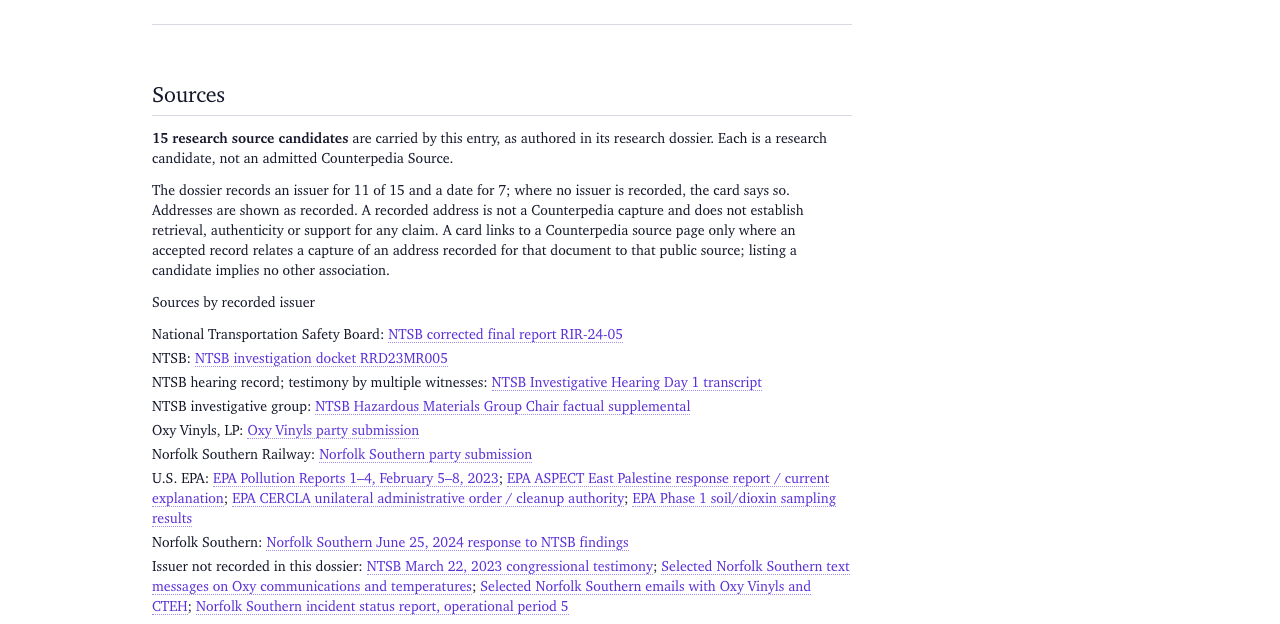
Full-release draft — not publication-verified. 9 capability pages and 18 manual chapters. 143 of 152 screenshot boxes are planned captures, not actual product images; 9 figures are verified captures, each labelled with the route and commit they were taken from. Product access and individual features must be validated separately.
Search by subject name, identify the result type and origin, and follow a reference to a document you can cite.
Example: why the Statue of Liberty is green
Why is the Statue of Liberty green?
SCREENSHOT TO BE ADDEDFull interface
▧
C01-01 · P0
C01-01Search opened with ordinary-language subject query.Planned capture; not an image of a verified product state.
This example uses a subject search, a publisher document, and a historical image record. The search identifies the monument. The NPS document explains its copper exterior; the image record supplies historical context.
The National Park Service’s Statue of Liberty facts identify copper as the exterior material and describe its oxidation. Read the publisher document rather than rely on a result snippet. The direct NPS links in this guide identify external publisher pages, not retained Counterpedia copies.
Find the statue and its sources
Open Search and enter Statue of Liberty.
Read the result type before opening a match. A subject or entity provides a starting point; a source reference identifies a particular publisher or document; an image, observation or retained record may have a different origin and evidentiary status.
Choose the entry that identifies the monument on Liberty Island, rather than an incidental mention or photograph title. Open its related material and look for a connection to copper, Liberty Island, its construction or an original document.
Open the NPS explanation and read the passage on copper oxidation and the green patina.
Record the subject reference, document title, publisher, URL, and any stated date or edition. Use those details in your citation.
Result: a source-attributed explanation of the green patina and a citation to the NPS document used.
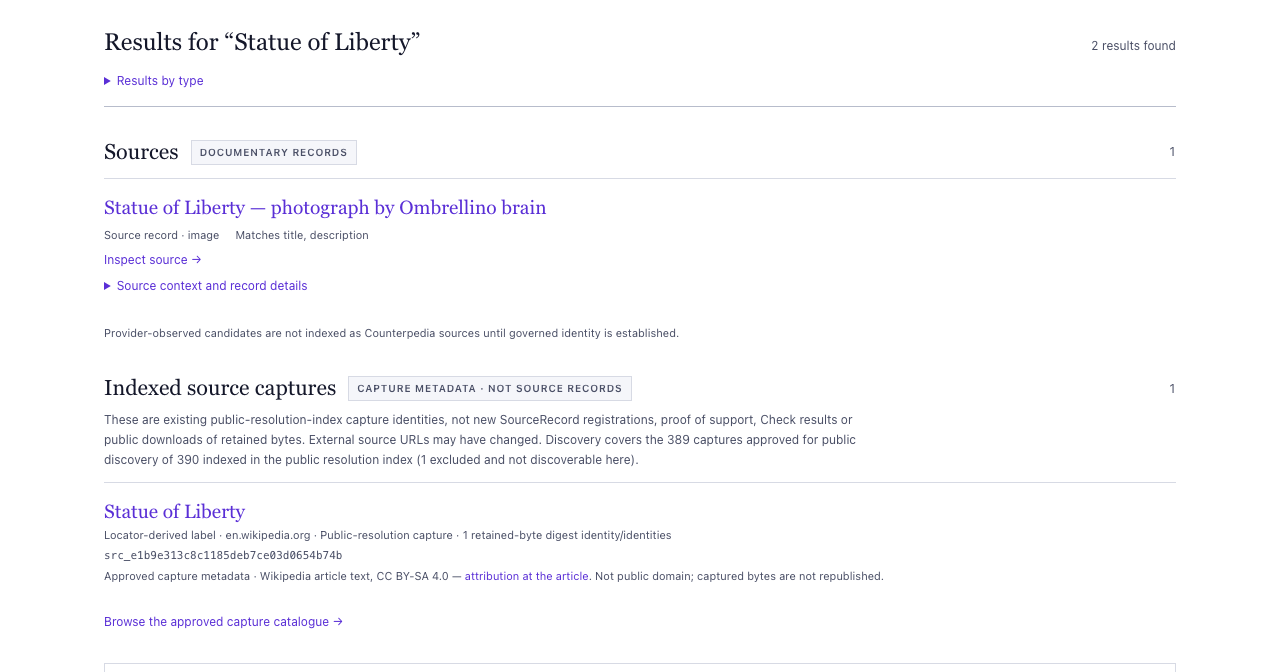
Search for “Statue of Liberty” returns two results of different kinds: a Source record for a credited photograph under Documentary records, and an indexed capture of a Wikipedia article labelled as capture metadata, not a Source record.Captured from /search?q=Statue%20of%20Liberty at e661b48 on 2026-10-28
Copper, Liberty Island, the statue’s construction or historical photographs
Return reference
The exact article or object address you actually opened
Compare the explanatory and photographic sources
Open the early photograph record in the Library of Congress. Compare its date, contributor, and subject with the NPS document. The photograph records an appearance; the NPS text explains the material. Record what each source contributes rather than count them as two independent confirmations of the color explanation.
SCREENSHOT TO BE ADDEDWorkflow sequence
▧
C01-03 · P0
C01-03Identified subject followed to an attributable documentary source.Planned capture; not an image of a verified product state.
You can continue into the statue’s creator, Frédéric Auguste Bartholdi, the place where it stands, or the chronology of its copper skin. Each step should lead to an identified object or document, not merely another unlabeled line on a graph.
What a match does and doesn’t mean
A search result shows a match within the material being searched; it is not an endorsement. A provider reference is not necessarily a retained document. A Source Record, a retained capture and a completed assessment each have separate identities and conditions. If the source you want is absent from Counterpedia, you can consult the identified original publisher directly without claiming it was found in Counterpedia’s catalogue.
If you see no result, try Liberty Enlightening the World or the specific document title. Missing results describe the selected collection’s coverage; they do not prove the monument or document is absent elsewhere.
Continue
Searching Counterpedia takes this same question through result categories, source paths and recovery techniques. Explore the knowledge universe broadens the journey into connections and historical images. For a statement requiring an assessment, Check information is an optional separate task.
Capability 2 · capabilities-02
Explore the knowledge universe
Explore the knowledge universe
Product promise
Browse a collection, open a subject, inspect a recorded relationship, and follow its document references.
C02-01Browse landing page and visible collections.Planned capture; not an image of a verified product state.
Browse groups these types of records into collections. A collection listing, a relationship, and a citation describe different ways in which records are connected.
Browse the subject and inspect a reference
Open Browse and choose a collection containing monuments, places, reference subjects or historical material.
Find the Statue of Liberty subject. Confirm that it describes the monument on Liberty Island rather than a photograph or replica.
Follow one related subject, such as Liberty Island, Frédéric Auguste Bartholdi, or copper. Read the relationship label and the source attribution before treating it as anything more than a connection.
Return to the collection and choose another direction. Note how the second view adds context that the first result could not provide on its own.
The NPS and Library of Congress links above open publisher records. Keep those external document references separate from the relationship links you followed in Counterpedia.
SCREENSHOT TO BE ADDEDAnnotated detail
▧
C02-02 · P0
C02-02Subject or object card within a selected collection.Planned capture; not an image of a verified product state.
Make sense of the different objects
What you encounter
What it contributes
Subject
The named monument and its identity
Place
Liberty Island and the monument’s geographical context
Person
The sculptor or other documented people connected to it
Material
Copper and the explanation of its changing appearance
Historical image
A visual document with a contributor, date and collection
Original explanatory source
The NPS account of oxidation and the patina
Observed reference
A citation or pointer to a document
Source Record
Documentary identity and recorded destinations; inspect retained-copy information separately
An observation about an object is not the same thing as a retained document; a document’s publisher is not necessarily the provider that supplied an index entry. A single connection does not prove the statement it seems to depict.
SCREENSHOT TO BE ADDEDAnnotated detail
▧
C02-03 · P0
C02-03Related subjects, source references, and collection provenance shown together.Planned capture; not an image of a verified product state.
Record the references used
Keep the monument subject you actually opened, one meaningful related item and a specific documentary source. If the original explanation came from NPS, preserve its URL and publisher. If the historical photograph came from the Library of Congress, keep its item record rather than an unattributed image preview.
The browsing output is a subject reference, a recorded relationship, and a document citation. Run Check separately to assess a precise statement.
If a collection is sparse or a link unavailable, try another grouping, use Searching Counterpedia, or inspect the known original publisher. Missing material in one collection is not evidence that the subject does not exist.
Move from one subject to related people, places, ideas, and documents. Understand what each recorded connection means, where it came from, and where it can take your research.
Start with a subject and a question
Open a subject from Search or Browse. You might be investigating how a monument relates to a place, how an author relates to a work, or why two organizations appear together. You need the name of a subject and something you want to understand—not a graph identifier.
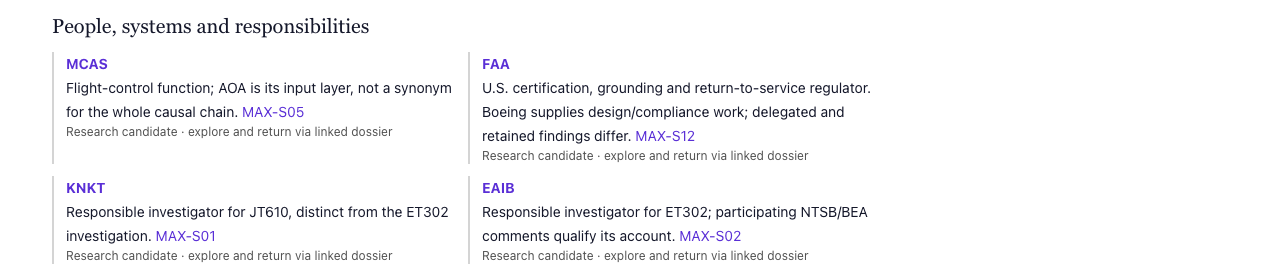
The Boeing 737 MAX linked dossier’s “People, systems and responsibilities” view: MCAS, the FAA, KNKT and EAIB, each with its role and a source identifier, and each labelled as a research candidate rather than an admitted relationship.Captured from /research/demo-corpus-twelve/boeing-737-max-demo-corpus-dossier-v0-1-linked at e661b48 on 2026-10-28
Find the subject’s relationships or connected-material view. Treat its connections as invitations to examine other identified objects, not as automatic answers. One link might describe an association from a structured collection; another may point to a document, a publisher’s reference, or an independently maintained record. The connection tells you where to look next. Its source context tells you what kind of statement you found.
Read one connection before following it
Choose a relationship relevant to your question, then read it in this order:
SCREENSHOT TO BE ADDEDField detail
▧
C03-02 · P0
C03-02A selected relationship with predicate, arrow/direction and provider.Planned capture; not an image of a verified product state.
Starting subject. Confirm which object you opened. Two objects with the same display name are not necessarily the same subject.
Relationship and direction. Identify what kind of connection is recorded and which way it points. “A is located in B” is not the same assertion as “B is located in A.”
Related subject or document. Inspect the destination’s type and identity before opening it. A subject, cited document, and observation are different destinations.
Origin and references. Look for the collection or provider that supplied the relationship and any documentary citation, qualifier, or time context. The original publisher of a cited document may be different from the provider of the relationship.
Next action. Open the destination or its attributable source if it advances your question. Keep a way to return to your original subject.
You can now explain the connection in a sentence: This source represents [starting subject] as related to [destination] through [relationship], with [origin or citation] supplied as context. If you cannot fill in its origin or support from what is shown, say what remains unknown instead.
Continue without confusing a path with proof
Return to the subject or explore one more meaningful connection from the destination. Compare the steps separately: each edge has its own direction, meaning, origin, and possible reference. A two-step path can suggest an interesting line of inquiry without proving a direct relationship, shared intent, or cause.
SCREENSHOT TO BE ADDEDWorkflow sequence
▧
C03-03 · P0
C03-03Two-step path with each endpoint and origin independently labeled.Planned capture; not an image of a verified product state.
When a view offers only the first group of related objects, use its continuation or next-page option to inspect more. A visible neighborhood is a bounded view, not the complete universe. If the next page is unavailable, distinguish the view’s limit from the absence of other relationships.
For an attributable documentary trail, follow the reference to the actual document and note its publisher and edition. A reference can identify material without proving that Counterpedia has retained its bytes or evaluated the underlying claim.
Leave with something you can reuse
Before moving on, keep the subject you began with, the connection you followed, its meaning and direction, the related object, and any source you actually inspected. That is a useful research outcome even if no relationship had an evaluable documentary reference.
If a relation appears reversed, ambiguous, missing, or unsupported, do not guess a correction. Recheck the endpoint identities, inspect another related view, or search the subject more narrowly. The distinction between a recorded connection and evidence for its truth should remain visible.
Find out who issued a document, which edition you are reading, and whether a link opens the publisher’s original, an archive, or a retained copy. Begin from a citation or look for a document in Source Atlas.
Why the source’s address is not its identity
A report can be issued by one organization and hosted by another. It may later be reissued, archived, or cited in research. Those links are useful, but they do not turn separate files into the same edition or make the hosting organization the report’s author.
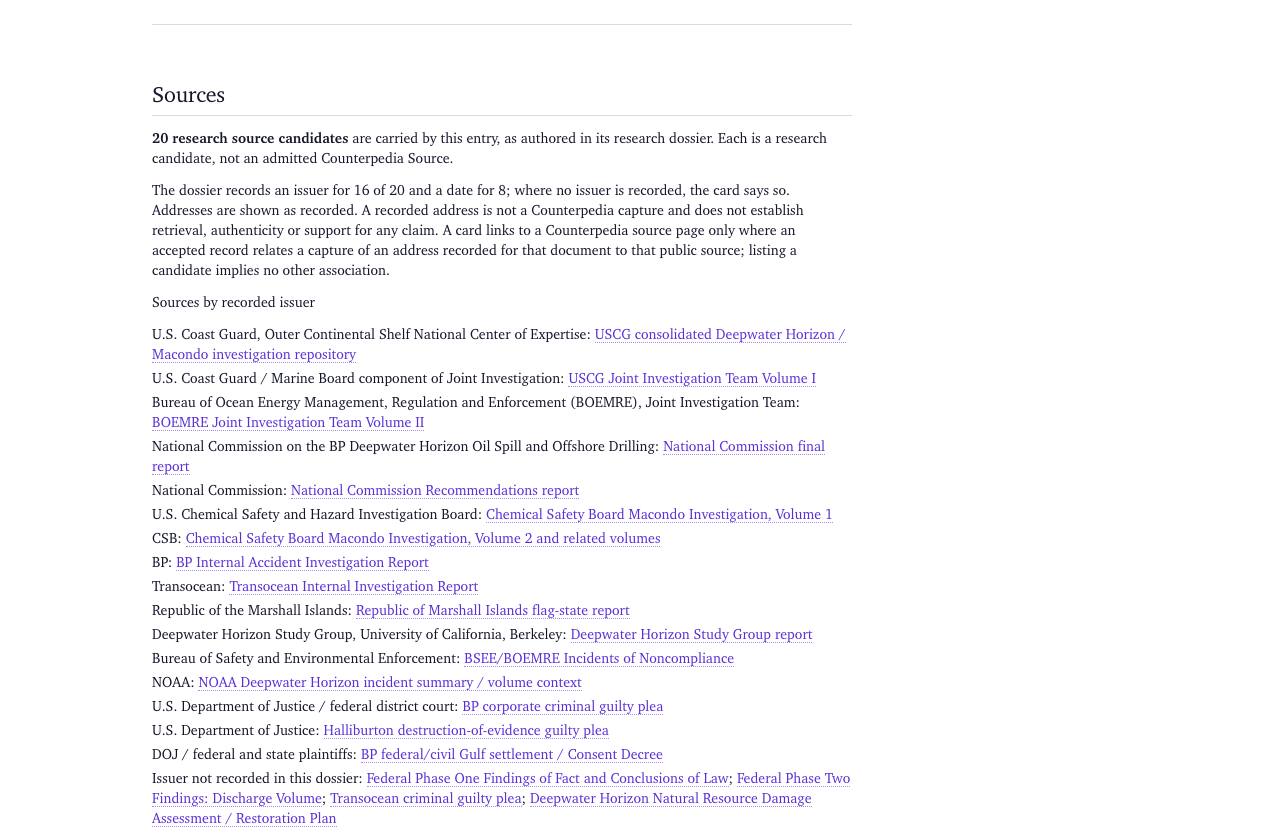
Consider the Deepwater Horizon / Macondo investigation. The U.S. Coast Guard’s investigation repository brings together reports written by different institutions. The National Commission’s report offers a broad investigation and policy account. The Chemical Safety Board’s investigation examines process-safety questions. A corporate report and a federal investigation are not interchangeable simply because they discuss the same accident.
Start from a citation
Select a citation in an entry or research record. Read the named document and the organization credited as author or issuer.
Open the cited destination. In the Deepwater example, choose a specific report from the official investigation repository, not just the repository index. Check the title page, report date, issuing organization, and volume before treating it as the source you intended.
Identify the exact question you want the document to address. A Coast Guard marine-casualty report, an offshore well-control investigation, and a policy commission report examine different parts of the event.
Keep the document title, issuer, report date, access URL, and any edition or volume identifier. If your question involves a particular claim, record the relevant page or passage.
Expected result: you can name the document and its author, rather than cite the topic or repository homepage as if either were the report.
Or begin with Source Atlas
Source Atlas is the other starting point: look for a registered Source Record if one exists for the report you chose. Search using the issuing organization and a distinctive part of the report title, then open a matching record instead of assuming the first similarly titled result is the same document.
SCREENSHOT TO BE ADDEDFull interface
▧
C04-01 · P0
C04-01Source Atlas search or source-discovery landing.Planned capture; not an image of a verified product state.
Match a Source Record to the document
Inspect the record’s title, issuer, date, edition, and recorded destinations. Compare those details to the external document you opened. A Source Record describes an identified document; it does not automatically prove that Counterpedia holds a copy, that a URL still works, or that any associated claim was checked.
SCREENSHOT TO BE ADDEDAnnotated detail
▧
C04-02 · P0
C04-02Source Record identity with publisher and edition/version.Planned capture; not an image of a verified product state.
Check the available destinations
Follow a permitted original, archived, or retained-material destination when that destination is actually present. Compare the edition or capture date before treating two files as interchangeable.
SCREENSHOT TO BE ADDEDCompare states
▧
C04-03 · P0
C04-03Original publisher, archive, and retained-copy destinations with differing states.Planned capture; not an image of a verified product state.
What you find
What it means
Your next step
An observed citation
Someone recorded a pointer to material
Follow and inspect the document yourself
A Source Record
A document has registered identity and metadata
Compare issuer, title, edition, and destinations
An original or archival link
A place from which material may be retrieved
Check the actual file or page and its date
Retained bytes with custody details
Specific material has been retained under a recorded identity
Inspect that copy and its provenance; do not infer claim support
An assessment or Check result
A separate question was evaluated under a stated scope
Read its exact outcome rather than promote a source link into a verdict
When the documents disagree
Do not collapse disagreement into a single quotation. Note each report’s mandate, evidence available at its publication date, and which exact proposition it addresses. Later documentation can improve an explanation without changing what an earlier author actually wrote. Even an authentic official report cannot answer every causal or legal question.
When a report is unavailable or only a citation is recorded, keep that state visible. You can still identify the publisher and look for another lawful source destination; you cannot describe unread bytes as examined.
Use an entry as orientation, then inspect the case records, original documents, and research that give particular statements their meaning. Keep each source’s author, procedural status and limits attached to what it says.
C05-01Entry reading view with inline citation.Planned capture; not an image of a verified product state.
Read the record in layers
Open a relevant subject or entry and identify the exact issue you are interested in: for example, what Theranos represented to its investors.
Look at an attributed claim or passage in that entry. Do not mistake an article’s summary for the source’s exact wording.
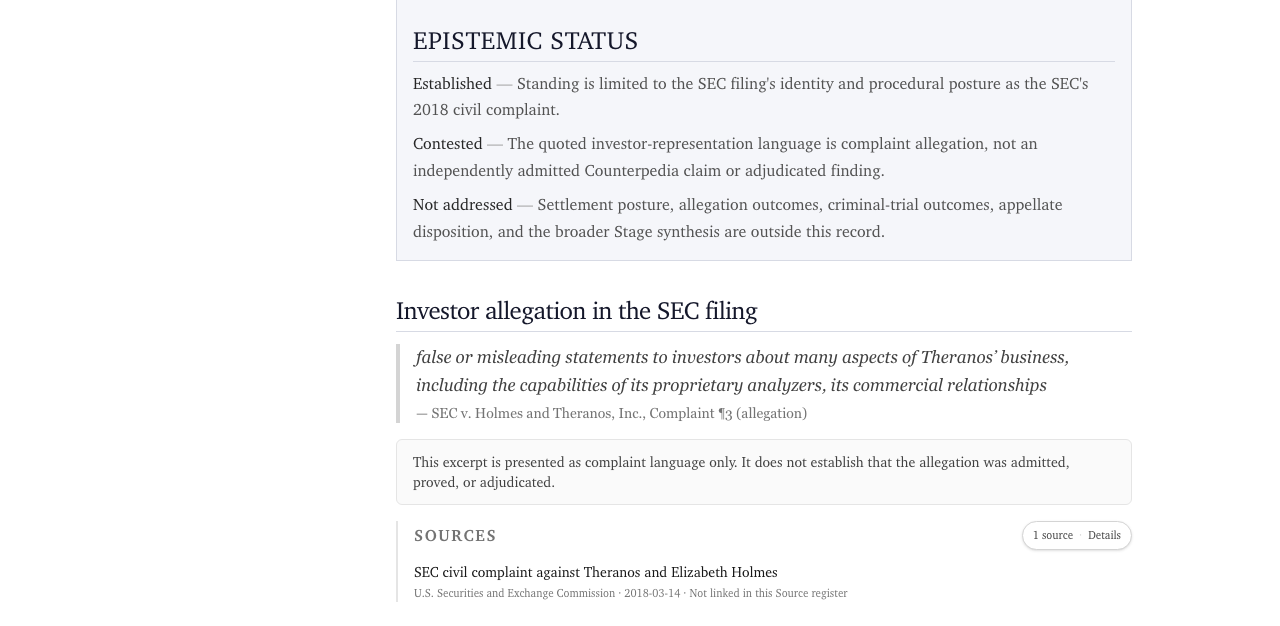
Follow the SEC announcement and distinguish the agency’s allegations from the stated civil settlement terms. The announcement explicitly records that Holmes and Theranos neither admitted nor denied the allegations.
Read the DOJ verdict account for the particular investor-fraud counts the jury decided. That verdict does not adjudicate every sentence of the earlier civil complaint.
Return to the entry and see how a research document, a case chronology, or another source changes the question you can now ask. Preserve the original author’s attribution and the difference between allegation, disposition, and interpretation.
Expected result: you can explain which document recorded a claim and which legal act resolved a particular charge, without turning every official document into the same kind of proof.
SCREENSHOT TO BE ADDEDAnnotated detail
▧
C05-02 · P1
C05-02Citation destination or related research/case link.Planned capture; not an image of a verified product state.
Different records contribute different things
Material
Best use
Boundary
Entry or profile
Understand the subject and locate questions
A readable overview is not itself an adjudication
Civil complaint
Read allegations and the government’s pleaded theory
Allegations are not findings merely because filed
Settlement
Determine how specified claims were resolved
A no-admit/no-deny settlement does not admit each allegation
Criminal verdict
See the counts the jury found proved
Different counts, defendants, or proceedings remain distinct
Research document
Read a sourced synthesis and open questions
Its published analysis does not automatically gain judicial or governed standing
An additional, narrower source is the FDA’s 510(k) record K143236. It names the Theranos Herpes Simplex Virus-1 IgG Assay and records a July 2, 2015 substantial-equivalence decision for that particular device. It does not establish blanket approval of Theranos or prove the performance of every blood test the company advertised. Use it to answer the device-specific regulatory question, not to overwrite the scope of the SEC or DOJ records.
SCREENSHOT TO BE ADDEDCompare states
▧
C05-03 · P1
C05-03Distinct attributed positions or documents compared without an invented verdict.Planned capture; not an image of a verified product state.
A useful endpoint can be a citation, a qualified comparison, or a more precise unresolved question. You do not need every subject to have a controversy or every article to have a case.
Understand what changed between two recorded versions, what evidence or decision was attached to the change, and which version you should cite.
Start with a changing investigation
Early reporting about the 2023 loss of OceanGate’s Titan submersible and the later accident investigations do not carry identical information. The U.S. Coast Guard Marine Board report and the NTSB’s investigation docket are identifiable sources with different publication and procedural contexts. A warning written before the casualty and an investigator’s later interpretation of physical evidence also answer different questions.
That is why history matters: a later statement may reflect new material, a corrected description, a changed interpretation, or merely a newer edition. The date alone cannot tell you which.
Read the history as distinct events
Open a record with a visible history or version list. Identify the current version and one earlier version. If your chosen object has no recorded history, choose another; do not invent a revision.
Compare the same statement in the two versions. Identify what changed: language, citation, status, qualifier, or underlying object identity.
Read any recorded reason or decision attached to that revision. Was a source added? A correction made? An interpretation reconsidered? Note the reason as recorded, not as a retrospective guess.
Open the cited evidence where permissible. A report issued in 2025 may analyze data collected in 2023 or warnings written in 2018. Keep the event, evidence and revision dates separate.
Return to the version you need to cite. Capture its edition, version identifier or timestamp, and any successor link actually shown.
Expected result: you can state what changed, when it was recorded, and what reason was supplied, without treating a newer version as automatically more reliable.
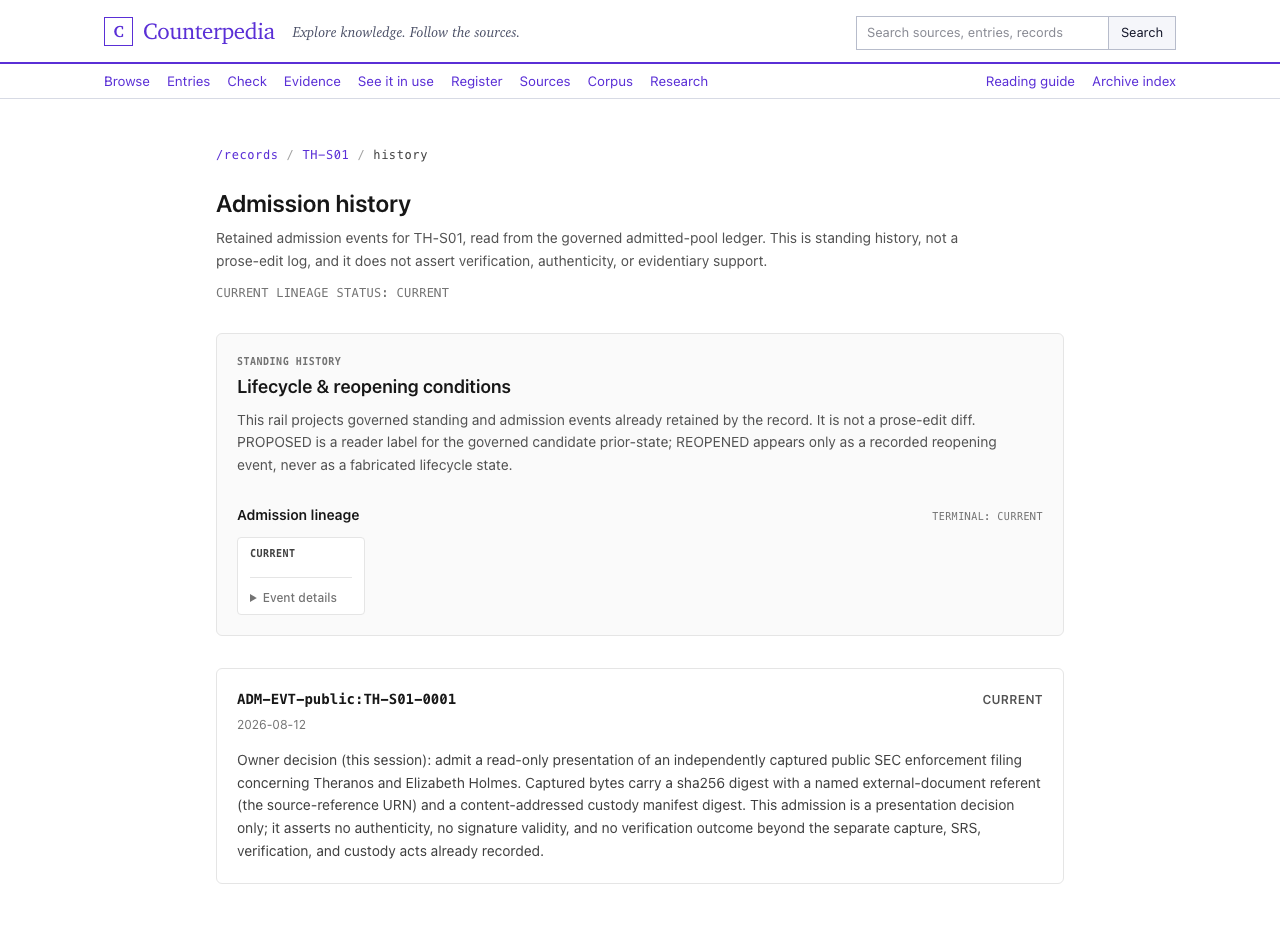
Admission history for record TH-S01: a single retained admission event (2026-08-12) in the governed ledger, described as standing history rather than a prose-edit log. One recorded state cannot by itself support a version comparison.Captured from /records/TH-S01/history at e661b48 on 2026-10-28
SCREENSHOT TO BE ADDEDCompare states
▧
C06-02 · P1
C06-02Previous and current revisions highlighting precise changed text.Planned capture; not an image of a verified product state.
Understand refusals and supersession
A refusal, reconsideration or supersession is a recorded action with its own scope. A refused claim may have an explicit reason or a condition for reopening; it is not necessarily a permanent judgment on the underlying proposition. A successor may replace an earlier record for current reading without erasing the earlier record’s history.
SCREENSHOT TO BE ADDEDAnnotated detail
▧
C06-03 · P1
C06-03Recorded change reason, refusal, or supersession with provenance.Planned capture; not an image of a verified product state.
When a record has no recorded reason for a change, write reason not supplied in this view, not there was no reason. Do the same with a missing prior version. That is an honest boundary on what the history establishes.
What to take away
Leave with a specific earlier and current version, one identifiable change, the cited basis if available, and a version-aware citation. Following a record through time walks through the comparison; Understanding evidence and uncertainty explains the distinct evaluation states.
Take one statement and its source context through a bounded assessment. Understand which questions were evaluated, what each result says, and what its receipt lets you inspect later.
One statement, not an entire controversy
Consider the Volkswagen diesel-emissions record. An EPA violation notice concerning 2.0-liter diesel vehicles and a California Air Resources Board archive supply identifiable regulatory material. They do not answer every question about every model, executive, consumer claim, or later remedy.
Select a precise proposition: The September 2015 EPA notice accused specified Volkswagen vehicles of using software to circumvent emissions testing requirements. This is a claim about what the notice alleges. It is not the same as asserting that a particular vehicle, officer or case was independently adjudicated under every subsequent law.
Prepare, run and inspect
SCREENSHOT TO BE ADDEDFull interface
▧
C07-01 · P0
C07-01Check preparation: statement and source input.Planned capture; not an image of a verified product state.
SCREENSHOT TO BE ADDEDAnnotated detail
▧
C07-02 · P0
C07-02Submission scope/what will be evaluated.Planned capture; not an image of a verified product state.
Write the exact statement and attach the particular source document, not merely a link to the Volkswagen topic.
Review the input before running Check: statement, source identity or URL, expected question scope, data shared with the operation, and account requirements. An imported answer may have lost its citation; restore or replace the missing source context explicitly.
Execute Check using the actual enabled interface and authorized identity. A prepared input alone is not a completed assessment.
Read the scoped result
SCREENSHOT TO BE ADDEDAnnotated detail
▧
C07-03 · P0
C07-03Returned per-question outcomes and reasons.Planned capture; not an image of a verified product state.
Open the returned result and read each named question with its recorded outcome, reason and source evidence. Whether a quote matches, a cited page resolves, or the source supports the proposition are different questions.
Inspect the receipt separately
Inspect the associated receipt when issued. It records the performed operation and its bounded result, not a universal verdict about the scandal.
Finish with the exact statement, source edition, per-question outcome and a link or permitted retrieval reference for returning to the result.
Expected result: you can explain what was assessed and what remains unevaluated without converting a valid reference into proof of a broader conclusion.
SCREENSHOT TO BE ADDEDField detail
▧
C07-04 · P0
C07-04Receipt reference next to, but distinct from, the assessment outcome.Planned capture; not an image of a verified product state.
When Check does not conclude
Distinguish four conditions: a question not evaluated, a question evaluated but unresolved, an operation refused under policy or access rules, and an execution failure. These are different statuses and require different next actions. A technically successful receipt integrity check is also separate from rerunning the original assessment.
If your research task was simply to identify the EPA notice and cite its contents, you can finish without Check. The full Check tutorial is for the additional assessment task; evidence and uncertainty explains the distinctions in more detail.
Take an identified Counterpedia record into another application or AI agent without losing the version, original sources, or limits attached to it.
Start with a familiar subject
Imagine reading the Boeing 737 MAX entry in a browser, then asking a research agent to work with the same record. The useful result is not simply that both clients return text about Boeing. They should identify the same object and edition, distinguish its supporting documents from the entry’s own account, and tell you which information is available to the requesting client.
This is an example of reading Counterpedia. Running a new Check, changing an entry, publishing research, and accessing someone else’s saved result require their own permissions and operations.
1. Choose the documented read interface
Start with Counterpedia’s maintained developer documentation or machine-readable discovery resources. Choose a supported read interface appropriate for your client: direct API, an SDK, or an MCP-compatible agent. Read the maintained operation description to learn what inputs it expects and what it returns. Do not assume those interfaces have identical tools or permissions.
SCREENSHOT TO BE ADDEDFull interface
▧
C08-01 · P1
C08-01Actual interface documentation: API/SDK/MCP entry point.Planned capture; not an image of a verified product state.
A request may start with a known object identifier. Its display title alone is not a stable identifier, particularly where similarly named products, proceedings, or people appear together.
2. Read one object and its source context
Use the documented read operation for an identified Boeing 737 MAX record, if the available collection includes one. Otherwise use another real returned record and keep its original identity rather than inventing a Boeing result. Inspect its object identity, type, available version information, cited sources, and access or completeness limits. If a source reference is exposed, use the separate documented read path to inspect it. Do not synthesize a URL or treat a topical resemblance as an identity join.
SCREENSHOT TO BE ADDEDCompare states
▧
C08-02 · P1
C08-02Real read request and returned response (credentials redacted).Planned capture; not an image of a verified product state.
Expected result: the client can point to one identified object and explain at least one linked reference, rather than producing an unattributed answer about an aircraft.
3. Compare human and machine views
Open the same identified version in Counterpedia’s human reader. Ask whether the subject identity, scope, source references, and recorded uncertainties agree. The machine result may be structured differently, but it should not silently promote an allegation into a finding or omit a limitation material to the answer.
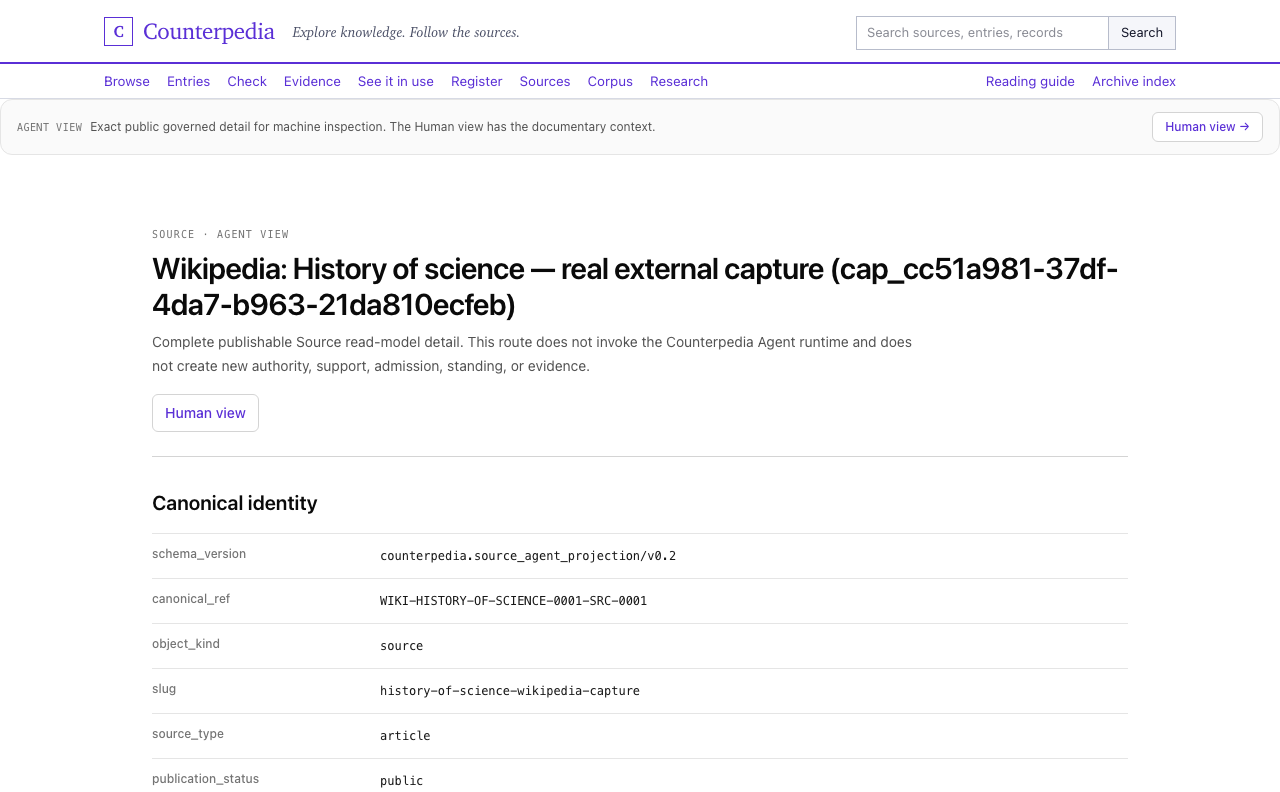
Agent view of the History of Science source: the machine-inspection projection lists canonical identity fields (schema version, canonical reference, object kind, slug, source type, publication status) and states that the route creates no new authority or evidence.Captured from /sources/WIKI-HISTORY-OF-SCIENCE-0001-SRC-0001/agent at e661b48 on 2026-10-28
If the client receives no object, a restricted result, or a schema error, preserve that outcome. Do not substitute a different record just to make the example succeed.
4. Reuse without changing authority
Carry the record identifier, edition, source attribution, and permitted inspection destination into the application’s output. Check the document’s licence before copying retained material. A readable receipt is not a new verification, and a machine-readable response does not authorize Check or publication.
For an end-to-end setup and recovery path, continue with Using Counterpedia with agents and software. The complete result is a source-aware read in another client, not an assumption that every integration already exists.
Understand the size and limits of what a collection represents, what kind of objects its numbers count, and which sources or operations you can actually access.
Breadth is not one number
Consider the 2008 financial crisis and Lehman Brothers. The Financial Crisis Inquiry Commission’s final report includes an adopted majority account and signed dissents. The Lehman bankruptcy examiner materials are another document family, preserved by a different host. Counting pages, named people, findings, dissenting passages and independent source editions produces different totals. None of those counts alone measures how fully Counterpedia represents the crisis.
Read a coverage view in context
Open a collection or coverage view and identify the provider, subject area, release or time boundary, and displayed unit of counting.
Separate subject/entity observations from recorded relationships, cited references, registered Source Records, retained source editions, and completed assessments. They are not interchangeable units.
Read any access or quality qualifiers. A cited source can be accessible externally without a retained copy; a registered record may have restricted destinations; a statement may be represented but never checked.
Open one subject and one source to confirm what the counts meant in practice. For the Lehman example, distinguish the FCIC majority report and its authored dissents even where they share a single PDF.
If a result is absent, check your collection filters, identifiers, provider scope and access state before treating that absence as a conclusion about the world.
Expected result: you can explain what was counted, where it came from, and what the selected release actually makes available.
SCREENSHOT TO BE ADDEDAnnotated detail
▧
C09-01 · P0
C09-01Collection scope and what a displayed count actually measures.Planned capture; not an image of a verified product state.
Compare unlike forms of coverage
SCREENSHOT TO BE ADDEDCompare states
▧
C09-02 · P0
C09-02Reference versus Source Record versus retained copy versus assessed result.Planned capture; not an image of a verified product state.
Coverage unit
Useful question
Limitation
Subjects or observations
Which identified topics are represented?
Not a count of independently verified propositions
Relationships
Which predicates and targets were recorded?
Not proof that every path implies support
Source references
Which documents were pointed to?
Not proof of access, capture or readability
Source Records
Which document identities are registered?
Not the breadth of the knowledge universe
Retained material
Which editions or bytes are actually held?
Not a verdict on their contents
Checks
Which specific questions were evaluated?
Not coverage of every statement about a subject
When something is unavailable
Different conditions suggest different next steps. A missing result may call for different search terms or a broader collection. A restricted document calls for the owning access path or another permitted original. A missing retained copy calls for an external source or a documented acquisition route. An unavailable operation is not a failed assessment of a claim. Preserve the difference in your notes.
SCREENSHOT TO BE ADDEDAnnotated detail
▧
C09-03 · P0
C09-03Coverage gap, inaccessible source, or unavailable operation distinguished in the product.Planned capture; not an image of a verified product state.
Finish with useful context
When discussing scale, cite the selected collection, release and unit, not a bare counter. When discussing a subject, identify the documents you actually read and their distinct authorship. Continue with Help and terminology, Source inspection or Search.
Counterpedia is a place to find knowledge and see what it rests on. Start with something ordinary, like a monument, a person, or a question. You can discover a subject, open related material, read original documents, and decide how far your research needs to go.
You do not need to understand knowledge graphs, source registries, or Check to begin.
Reader outcome
Choose a starting point and finish with either a better-understood subject, an original source you can cite, or a clearly defined question for further investigation.
1. Start from a question you recognize
Try Why is the Statue of Liberty green? Search for the monument, then distinguish the subject entry from a photograph, incidental mention, or external publisher page. The National Park Service FAQ explains the copper surface and patina. The Library of Congress photograph record contributes historical visual context.
SCREENSHOT TO BE ADDEDFull interface
▧
M01-01 · P0
M01-01Full-width product home and primary navigation.Planned capture; not an image of a verified product state.
The document and the photograph have different jobs. A historical picture does not, on its own, explain the chemistry; an explanatory document does not replace the image.
2. Choose where to go next
If you want to…
Start with…
Leave with…
Find a subject by name
Search
An identified result and a relevant source
Look around a field of knowledge
Browse
A related subject, relationship or collection
Understand an account
Entries
Its claims, citations and reading context
Inspect an original document
Sources
Publisher, edition, reference and access details
Follow a dispute or inquiry
Cases or Research
Attributed positions, documents and open questions
Evaluate a specific statement
Check
The recorded questions and outcomes of an authorized assessment
Check is a separate task. A useful search may finish after reading and citing the relevant document.
SCREENSHOT TO BE ADDEDAnnotated detail
▧
M01-02 · P0
M01-02Annotated route map: Search, Browse, Entries, Sources, Cases, Research, Check.Planned capture; not an image of a verified product state.
3. Read connections and original sources differently
A relation such as sculptor of or located on can help you navigate from one subject to another. Its label, direction and origin describe what was recorded; they do not automatically prove every conclusion a reader might draw.
When a connection supplies a documentary reference, follow it to the publisher and the passage you need. The imported provider, the publisher and any retained copy need not be the same thing.
4. Finish one useful task
For the Statue question, finish when you can say in your own words how copper acquired its green patina and name the NPS document you inspected. Record the publisher, URL and date you read it. You can continue into the monument’s history or relationships, but you do not have to.
SCREENSHOT TO BE ADDEDCompare states
▧
M01-03 · P1
M01-03Choose discovery, source inspection or assessment based on desired output.Planned capture; not an image of a verified product state.
If your first result is ambiguous, check the subject type and identifying details, then narrow the query. If a reference will not open, note the inaccessible source rather than guessing its contents.
Choose one way to begin. You can start with a question, a document, or a statement you want to assess. Each path ends with something useful. You do not need to complete all three.
Reader outcome
Finish one small research task and keep enough information to return to what you found.
Before you begin
Public searching and reading can begin without a private research account. For restricted documents, private saving or Check execution, use the appropriate account and permission. The Check path is optional and depends on access to the chosen operation.
1. Pick a starting path
Your starting point
Try this question
Useful result
A question
Why is the Statue of Liberty green?
A source-backed explanation with a document citation
A document
What does the SEC’s Theranos complaint actually allege?
The specific filing and its procedural status
A statement
What did EPA’s 2015 Volkswagen notice say about defeat-device software?
A prepared, bounded statement and, if executed, its actual Check result
Recommended first path: the Statue. It needs no Check and shows how a search becomes a document you can read.
SCREENSHOT TO BE ADDEDFull interface
▧
M02-01 · P0
M02-01Beginner’s task-selection destinations or actual entry points.Planned capture; not an image of a verified product state.
2. Search for a subject, not a magic phrase
Enter Statue of Liberty and inspect the returned types. Choose the monument on Liberty Island rather than a photograph or similarly named subject. Note what collection or provider supplied the result.
SCREENSHOT TO BE ADDEDAnnotated detail
▧
M02-02 · P0
M02-02First real Search query.Planned capture; not an image of a verified product state.
SCREENSHOT TO BE ADDEDWorkflow sequence
▧
M02-03 · P0
M02-03Correctly typed search result and selected subject.Planned capture; not an image of a verified product state.
Follow the material about its copper surface to the National Park Service FAQ. Read the paragraph on oxidation and the green patina. Record the page title, publisher, URL and date accessed.
Expected result: you can answer the color question and cite a source you actually opened.
3. Try the document-first alternative
Open a named source or start from a source reference. The SEC’s 2018 Theranos complaint is an example of why document status matters: a regulator’s allegations in a complaint are not interchangeable with a later criminal verdict.
SCREENSHOT TO BE ADDEDAnnotated detail
▧
M02-04 · P0
M02-04Original publisher document / source reference reached.Planned capture; not an image of a verified product state.
Identify the publisher, proceeding, date and relevant passage. Leave with a citation to the complaint as a complaint. If the exact source is not registered or retained by Counterpedia, use the original publisher destination and say so.
4. Use Check only for a statement that needs it
Take a narrow proposition about the contents of the EPA’s September 2015 Volkswagen notice. Keep the statement and the specific notice together in the preparation step. Review the scope and permission requirements before an authorized Check.
When the operation runs, read each recorded question, outcome and reason. When it cannot run, the result is not a completed Check. Do not infer a verdict from the preparation form.
For the question path, keep the NPS citation. For the document path, keep the SEC filing identity and procedural role. For a completed Check, retain the operation or result identity, source context and any retrieval material provided under its access rules.
SCREENSHOT TO BE ADDEDCompare states
▧
M02-05 · P0
M02-05Final citation or reference recorded; Check shown only as optional alternate path.Planned capture; not an image of a verified product state.
If a path stops early: refine an ambiguous query, follow an authorized public source when a copy is missing, or examine a stated access/error reason without inventing an assessment.
A workspace is where you move between finding, reading, and doing. Search and Browse help you find material. Entries, Cases, Research and Sources help you understand it. Check and private saving perform separate operations with their own permissions.
Reader outcome
Recognize the main destinations, choose the next page for your question, and understand why some operations require a signed-in identity.
1. Find your starting point
Open Search if you know a name or question. Open Browse if you want to explore a collection before narrowing down. For a familiar trial, use the Statue of Liberty, then choose an identified monument entry instead of a photograph with a similar title.
SCREENSHOT TO BE ADDEDFull interface
▧
M03-01 · P0
M03-01Global navigation and page families.Planned capture; not an image of a verified product state.
A search result is an invitation to inspect something. The result’s type, provider and available identity tell you what you have selected.
2. Know the difference between page families
Destination
What you do there
Entries
Read a subject account, citations, relationships and available qualifications
Sources / Source Atlas
Inspect the identity, publisher, version and destinations of documents
Cases
Follow a question through attributed positions, documents and decisions
Research
Read longer research work and its separate artifacts and cited materials
History
Compare recorded versions, decisions and changes where supplied
Check
Prepare and execute an authorized assessment of a particular statement
A single subject may connect to more than one destination. A document mentioned in an entry does not necessarily have a retained copy. A graph link does not itself prove a claim.
SCREENSHOT TO BE ADDEDCompare states
▧
M03-02 · P0
M03-02Annotated contrast among an Entry, a Source, and a Research/Case page.Planned capture; not an image of a verified product state.
3. Move from one surface to another
After opening the Statue entry, inspect a related subject, such as Liberty Island, and follow a relevant document reference. To understand the source, read its named publisher and date. To return, keep the original subject reference or use the existing navigation.
For a different kind of subject, the Theranos reading chapter explains why allegations, findings and convictions must remain in their proper documentary contexts.
4. Recognize your access context
Public content may be readable without signing in. A private saved result belongs to its authorized identity; copying a URL does not grant a recipient access. A Check operation or authenticated software call uses the scope and permissions of that action.
SCREENSHOT TO BE ADDEDCompare states
▧
M03-03 · P1
M03-03Signed-out versus authorized private-work state (safe test account).Planned capture; not an image of a verified product state.
Before retrying an inaccessible item, distinguish signed out, wrong account, insufficient permission, and missing or unavailable material. They require different next steps.
5. Know when you’re finished
You might leave with an identified subject, a source citation, a connected research question or a Check result. All are valid outcomes; not every journey should end with assessment.
SCREENSHOT TO BE ADDEDAnnotated detail
▧
M03-04 · P1
M03-04Actual unavailable/permission state with next-step control.Planned capture; not an image of a verified product state.
If the navigation or destination is missing in a particular release, use its documented alternative, record the missing route and consult Help and limitations. Do not assume that an absent page means the underlying subject does not exist.
Search for the Statue of Liberty, identify the result type, open the NPS explanation, and record the source used to answer the color question.
Our question and sources
Why is the Statue of Liberty green?
SCREENSHOT TO BE ADDEDFull interface
▧
M04-01 · P0
M04-01Search landing and Statue of Liberty query.Planned capture; not an image of a verified product state.
Enter Statue of Liberty, select the monument, read the NPS document on its copper surface, and record the document citation. Then compare what the historical photograph adds.
The National Park Service FAQ describes oxidation and the development of the green patina. The NPS facts page provides a companion material description. Both pages are from the same publisher; their agreement is not independent corroboration. These links open the external NPS documents.
Before you begin
You need only the ordinary phrase Statue of Liberty. Publicly accessible subjects and source references may be read without private research access. Other objects, privately saved work and live external-source actions retain their own account and permission requirements.
1. Search using an ordinary name
Open Counterpedia’s Search experience, enter Statue of Liberty, and read the returned groupings. Select the result that identifies the monument on Liberty Island. The known Wikidata subject identifier is Q9202, but you do not need it to start.
SCREENSHOT TO BE ADDEDAnnotated detail
▧
M04-02 · P0
M04-02Result groups with explicit subject/document/observation types.Planned capture; not an image of a verified product state.
SCREENSHOT TO BE ADDEDAnnotated detail
▧
M04-03 · P0
M04-03Monument selected with disambiguating identity/location.Planned capture; not an image of a verified product state.
Before following a link, inspect what kind of match you have:
Result type
Useful for
Does not automatically establish
Subject or entity
Exploring the statue and related concepts
All statements about it are true or assessed
Document or source reference
Reaching an identified publication or edition
The content has been retained or admitted
Provider observation
Learning what a connected dataset reports
The dataset’s claims have been verified
Source Record
Inspecting documentary identity and recorded destinations
A retained copy or a completed assessment exists
Read the destination’s identity, attribution, and scope before using it as a source. A subject match, a reference, and a retained document serve different tasks.
2. Open a source reference
Open the Statue of Liberty subject. Confirm that it represents the monument, not a person, a replica, or a historical photo that merely mentions it. Identify any connected places, creator information and source references.
SCREENSHOT TO BE ADDEDField detail
▧
M04-04 · P0
M04-04Attributable NPS reference in product, if genuinely linked.Planned capture; not an image of a verified product state.
SCREENSHOT TO BE ADDEDAnnotated detail
▧
M04-05 · P0
M04-05NPS publisher page and oxidation passage, explicitly labeled external if needed.Planned capture; not an image of a verified product state.
Inspect the subject’s source references for the exterior material. Read the National Park Service FAQs and Statue of Liberty facts. The links here open the publisher directly. Record whether you reached the document through a subject reference or through this guide’s external link.
Read the NPS passage describing the copper exterior and green patina. Compare it with the result snippet before writing your explanation. Attribute the material description to NPS; a snippet, an imported observation, and a Counterpedia assessment are separate records.
Expected result: a citation identifying the NPS document and the passage used for the color explanation.
M04-06Library of Congress item record showing item title/date.Planned capture; not an image of a verified product state.
A historical photograph can help you explore how the statue appeared and how it was documented; it does not alone explain the chemistry of the patina. The NPS explanation and the Library of Congress image are complementary sources with different functions, not two votes on the same proposition.
For a structured knowledge route, a separate Wikidata item Q9202 identifies the monument and its relationships. Wikidata’s item is a provider observation context, not a reason to infer that every linked document has been independently checked.
4. Refine the search
Try searching Liberty Enlightening the World, the monument’s formal name, or Statue of Liberty copper. A more specific query may help locate a document or a subject without requiring a record identifier.
SCREENSHOT TO BE ADDEDCompare states
▧
M04-07 · P0
M04-07Refined query / ambiguous match before-and-after.Planned capture; not an image of a verified product state.
If the results are ambiguous, compare names, locations and object types. A replica or incidental reference is not interchangeable with the original monument. If no match appears, broaden the query or inspect another collection; an empty search does not prove global absence.
If you have a precise document URL or identifier, you can look it up directly, but this is an alternative, not the first step required of new readers.
5. Extend deliberately to external source search
Catalogue search and live source search are separate operations. For live source search, review the provider, query, and access requirements, then submit the request.
Use Statue of Liberty copper patina National Park Service as the query. Inspect the provider response and its source URLs. Receiving a live result is separate from registering a source, retaining a copy, running Check, or obtaining permission to redistribute the material.
If the request is refused or fails, retain the error and use the NPS link above to read the document directly. That external visit is separate from the provider request.
Record the exact result and edition you actually opened
A live publisher page may change. A frozen edition or retained capture, when legitimately available, has a different identity and temporal scope. Save whichever you actually used, without substituting an inferred record.
SCREENSHOT TO BE ADDEDAnnotated detail
▧
M04-08 · P0
M04-08Finished source citation / exact reference details to retain.Planned capture; not an image of a verified product state.
7. Finish the research task
The research task is complete when you can explain, in your own words, that the Statue of Liberty’s copper exterior turned green through oxidation, and point to the National Park Service page supporting that explanation.
Optional tutorials
The main procedure does not require these exercises. Choose a tutorial for a field-level comparison, or skip to the closing explanation below.
Tutorial: Distinguish a subject from documents about it
Compare a Douglas Adams subject result with a document that refers to him. Produce a record of the two identities and the explicit link between them.
Starting material
Use the name Douglas Adams to find the subject. The external Wikidata identifier Q42 can help disambiguate the person; it is not automatically an identifier accepted by every Counterpedia interface. Select one document from a reference attached to that subject. Keep the subject and the document open separately.
1. Identify the subject result
Record the displayed name, object type, originating dataset, exact subject identifier, and the address you opened. Record a release or version identifier when the view supplies one. An alias explains a name match; it does not create a second subject.
Expected result: you can distinguish the subject from another result with similar words in its title.
2. Follow the recorded reference
Open one reference attached to a particular statement. Record that statement’s identity or location, then record the document’s title, publisher, address, and any supplied document or edition identifier. Identify the provider that supplied the reference separately from the publisher of the document.
If the reference does not resolve, keep its exact locator and record the failed lookup. Do not substitute a similarly titled page and describe it as the original reference.
3. Compare the two objects
Field
Subject
Referenced document
Object type
The subject described by the result
The publication or document opened
Identifier
Exact identifier in its originating system
Exact document identifier, or the locator when that is all that is supplied
Version
Release or record version supplied by the subject view
Document edition or date supplied by the document view
Origin
Dataset or record owner
Publisher; separately, the reference provider
Relationship
Statement or reference through which you navigated
Destination of that reference
A document can be about the person without being the person’s subject record. A document title containing the person’s name does not establish an identity equivalence between them.
4. Compare an identifier lookup
Use Q42 with the documented identifier search and compare the result with the name search. Compare identifiers and origins, not just titles. A lookup through another client must use that client’s documented identifier format; do not pass a QID as an unrelated record ID.
Output and completion check
Keep the completed comparison, the two addresses, and the statement-level reference connecting them. The exercise is complete when another reader can reopen each object and explain which one represents the person and which one is a document about the person. A failed reference remains visible in the output; it is not a failed attempt to identify the subject.
Apply the procedure elsewhere
Repeat the comparison for Eotyrannus using one of its recorded references. Keep the same fields. Change the example inputs, not the identity rules.
Use Browse to inspect the monument’s related place, creator, material, and documentary records. Compare the relationship data with the sources used for the color explanation.
Before you begin
You need a broad interest, not a precise record ID. In this walkthrough, start with the Statue of Liberty. Public collections may be explored without private research access. Restricted documents and external-provider actions retain their own rules; selecting Browse should not silently submit a new query to another service.
1. Choose a collection
Open Counterpedia’s Browse experience. Review available collections, directories or corpus views. Choose a grouping that includes public monuments, places, historical subjects or related reference material.
SCREENSHOT TO BE ADDEDFull interface
▧
M05-01 · P0
M05-01Browse collections and available scope.Planned capture; not an image of a verified product state.
SCREENSHOT TO BE ADDEDFull interface
▧
M05-02 · P0
M05-02Chosen collection with recognizable entries.Planned capture; not an image of a verified product state.
Before selecting an entry, inspect the grouping’s description. What does it include? Is it organized by subjects, source families, providers or documents? A broad directory is not a complete survey of everything Counterpedia holds.
View
What it helps you find
Collection or directory
A useful starting group of objects
Subject or entity
The monument and its connected concepts
Relationship or graph neighborhood
Related places, people, materials or records
Provider observation
Material reported by an external corpus
Source reference or document
An identifiable original publication or retained edition
2. Open the monument, not merely its name
Navigate to the subject identifying the Statue of Liberty on Liberty Island, New York Harbor. Check the title, location and type: a monument is distinct from a picture of the monument, a replica, or a text that only mentions it.
SCREENSHOT TO BE ADDEDAnnotated detail
▧
M05-03 · P0
M05-03Statue of Liberty subject identity, distinct from photographs/replicas.Planned capture; not an image of a verified product state.
Wikidata item Q9202 is the external identifier used for the monument in this example. Compare the identifier and origin shown on the subject page with that reference. A provider item and a Counterpedia-authored entry remain different records.
Expected result: you know which object you are browsing and the origin of the collection that describes it.
3. Inspect a relationship
Choose a related subject that adds to your question:
SCREENSHOT TO BE ADDEDField detail
▧
M05-04 · P0
M05-04One real related subject with provider and directed relationship.Planned capture; not an image of a verified product state.
Liberty Island: place, geography and the monument’s setting.
Copper: the material whose changing surface produced the green color.
Frédéric Auguste Bartholdi: the sculptor associated with the monument.
National Park Service: the public organization publishing the explanatory material we are reading.
Open a displayed relationship and read its direction, label, origin, and references. Record the subjects at both ends. A relationship reported by a provider is distinct from a separate assessment of that relationship. Use the recovery steps below when the intended target is not linked.
Expected result: the starting subject, relationship label and direction, destination subject, and origin are recorded.
M05-05NPS document linked or external-hop distinction.Planned capture; not an image of a verified product state.
Notice what this source establishes: it documents the park service’s explanation of a material process. It does not tell you whether a particular Counterpedia graph edge was independently assessed. Keep the original publisher URL and note any document version or date displayed when you read it.
If the publisher page is reached outside Counterpedia because no native reference is available, record it as an external original source. A direct publisher visit is still useful research.
M05-06Library of Congress historical photograph item and attribution.Planned capture; not an image of a verified product state.
The photo adds historical visual context, while the National Park Service supplies the physical explanation. A photo alone cannot establish the complete chemistry of the patina, and the NPS explanation is not a substitute for a dated historical image.
Read the item’s rights statement before copying or redistributing the photograph. Keep the item URL and contributor attribution with any permitted use. The collection name alone does not establish the rights for this image.
6. Explore a second direction
Return to the monument subject or your starting Browse collection and take a second path: from the monument to the island, to its sculptor, or to a source provider or image collection.
SCREENSHOT TO BE ADDEDWorkflow sequence
▧
M05-07 · P0
M05-07Return to collection and follow a different legitimate branch.Planned capture; not an image of a verified product state.
Compare the two views:
Question
First route
Second route
What kind of object?
Monument / material
Person / place / photograph
Where does it come from?
Named provider or publisher
Another observed source or document
What does it show?
Explanation of the green surface
Historical, geographic or biographical context
Can you return?
Identified subject/document
A second attributable identity
Record what each route adds: a relationship, an explanatory passage, or a dated image record.
7. Recover from missing or ambiguous material
No relevant collection entry: try the common name, the formal name Liberty Enlightening the World, or a more focused source title in Search.
A replica or unrelated photo appears: inspect its identity and return to the original monument subject.
A related entity is not linked: use Search to look for that subject or open the identified publisher document. Keep this separate lookup distinct from the relationship traversal.
An item cannot be opened: keep the reference you do have and note that you could not inspect its content. A URL is not proof of a retained copy.
The document’s rights or access are unclear: read the item’s provider and rights notes; do not turn discoverability into a license to redistribute or access private material.
8. Record the selected objects and sources
Before leaving, record the actual collection you visited, the subject you opened, one real relation, the original NPS explanation and the Library of Congress item that contributed context.
Field
Our guide’s reference
Starting subject
Statue of Liberty on Liberty Island
Main question
Why is its exterior green?
Structured knowledge identity
Wikidata Q9202 — external provider identifier for the monument
The collection, subject, and actual relationship you personally opened
Next step
Explore the monument’s construction, creators, materials or preservation
Complete the task by recording the selected collection, subject, relationship, and document references. State what the second source contributed. Check is a separate assessment task.
Follow two recorded relationships from a familiar subject, interpret their direction and origin, and leave with an identifiable research trail—not an unsupported conclusion.
Before you begin
Choose a subject you can already open from Search or Browse, and a question about something connected to it. For example: Which people, places, works, or documents are connected to this subject, and why?
You do not need to know a graph ID. Public relationships may be explored within their collection’s displayed scope; following a link to restricted material does not grant access. This tutorial uses your chosen subject, rather than presuming that the same sample object or specific relationship exists in every collection.
1. Open the subject’s connected view
Start on your subject’s page. Find the available related subjects, relationships, or graph view and open it. Read the title and the type or description of the object you are starting from.
SCREENSHOT TO BE ADDEDFull interface
▧
M06-01 · P0
M06-01Graph/relationship entry with starting subject and bounded neighborhood.Planned capture; not an image of a verified product state.
Look at what the view says it contains. It may show a selected collection, a local neighborhood of related objects, or the first page of a longer list. Before selecting a link, recognize that this is a view over recorded data, not an inventory of every relationship in the world.
If the page shows several groups or kinds of connections, choose the one most relevant to your question rather than simply taking the first visible result.
2. Read the first edge as a statement
Pick a connection from your subject to another person, place, concept, work, or source. Read the representation from end to end:
SCREENSHOT TO BE ADDEDAnnotated detail
▧
M06-02 · P0
M06-02First edge highlighted: subject, predicate, target and direction.Planned capture; not an image of a verified product state.
SCREENSHOT TO BE ADDEDCompare states
▧
M06-03 · P0
M06-03Incoming versus outgoing relation detail, where supported.Planned capture; not an image of a verified product state.
Look for
What to record
Starting object
The subject’s displayed name and available object identity
Predicate or relationship
The label describing how the two objects relate
Direction
Which object is the source of the recorded assertion and which is its target
Related object
Its type and identity, not just its displayed name
Origin and context
Provider or collection, applicable qualifiers, dates, and any reference shown
Direction matters. For illustration, A is located in B describes a different relationship from B is located in A. A graph may draw both objects next to each other, but their proximity does not establish either assertion. If the view shows an incoming link, do not silently rewrite it as an outgoing one or invent its inverse predicate.
Expected result: you can explain one recorded relationship in ordinary language while retaining its direction and origin. This is a description of what the source records, not yet a ruling that the assertion is true.
3. Open the related object and take a second step
Follow the selected link to its destination. Confirm the destination’s title, type, and identity. Return if it is a similarly named but different object.
SCREENSHOT TO BE ADDEDAnnotated detail
▧
M06-04 · P0
M06-04Open first target and verify exact identity.Planned capture; not an image of a verified product state.
SCREENSHOT TO BE ADDEDWorkflow sequence
▧
M06-05 · P0
M06-05Take a second real hop; show independent predicate and origin.Planned capture; not an image of a verified product state.
From the destination, select a second relationship that advances your question. Read its direction and origin separately from the first one. The two edges may come from different providers, different editions, or different observations.
Record the path in this form:
Step
Subject
Relationship and direction
Destination
Origin
1
Your starting object
The actual first predicate and its direction
The first related object
The displayed provider or collection
2
The first related object
The actual second predicate and its direction
The next object you opened
Its own displayed provider or collection
Expected result: you can retrace both steps and explain what each asserts. The existence of a path between the first and third objects does not establish a direct relationship, causation, agreement, ownership, or evidentiary support between them.
4. Inspect provenance and a documentary reference
Return to one edge in the path and inspect the source or provenance information associated with it. Keep four things separate:
SCREENSHOT TO BE ADDEDField detail
▧
M06-06 · P0
M06-06Origin, qualifier and citation detail for a particular edge.Planned capture; not an image of a verified product state.
SCREENSHOT TO BE ADDEDAnnotated detail
▧
M06-07 · P0
M06-07Cited publisher document in a distinct view, if available.Planned capture; not an image of a verified product state.
The producer or collection that reported or imported the relationship.
The underlying assertion: the particular subject, predicate, target, and any qualifiers.
A cited document or original publisher, if a reference was provided.
A retained copy or separate assessment, only if the view identifies one.
A Wikidata relationship, for example, may cite a work published by someone other than Wikidata. The imported statement and the publisher’s document are different objects. Following that citation helps you inspect a source; it does not mean the cited bytes were retained or that Counterpedia independently verified the statement.
Open a documentary reference where one is actually available, and identify its publisher, title, version or date when shown, and the relevant passage. If this relationship has no attached reference, preserve that absence rather than manufacturing a citation. Continue toward a source-backed relationship or end the trail with an explicit note that documentary support was not provided in the view.
5. Understand bounded neighborhoods and pagination
Return to the graph or related-material list. Check whether the visible neighborhood has a continuation, page boundary, or selected depth. If additional relationships are available, open the next group while retaining your place in the current trail.
SCREENSHOT TO BE ADDEDField detail
▧
M06-08 · P0
M06-08Pagination/depth or truncated-neighborhood boundary.Planned capture; not an image of a verified product state.
If the view ends or reports a limit, interpret it carefully: you have reached the boundary of this requested view, not demonstrated that the subject has no other connections. A missing relationship can reflect selection, coverage, indexing, access, or the original provider’s data.
When inspecting another provider’s neighborhood, do not assume identical identifiers refer to the same object unless the product records an identity relation. Similar names and URLs are not enough to construct a cross-source identity.
6. Recover from ambiguous, missing or restricted paths
A relationship appears backwards. Reread its subject, predicate, target, and any incoming/outgoing label. Preserve the recorded direction. Follow a supported reverse relation only when it is actually present.
Two objects have the same name. Open each object’s context and identifier before choosing; avoid joining them based on labels alone.
The related item or source cannot be opened. Keep the relationship and reference you actually saw, note the missing destination or access restriction, and try a different authorized source. A visible link does not grant permission to read or redistribute the target.
There is no visible relationship or reference. Change the collection or search scope, or select another connection relevant to your question. Do not infer that the relationship does not exist anywhere.
You cannot continue through a larger neighborhood. Note the page, depth or view boundary that stopped you. An incomplete traversal is still an accurately described result when its limit is explicit.
7. Return to your subject with an inspectable trail
Go back to the starting subject. You should now be able to answer:
SCREENSHOT TO BE ADDEDWorkflow sequence
▧
M06-09 · P0
M06-09Return path with two steps and explicit source identities.Planned capture; not an image of a verified product state.
What were the two objects connected by the first relationship, and what did its label and direction mean?
Which second relationship did you follow, and did its provider or origin differ?
Which document did you actually inspect, if one was available? Who published it, and which edition or passage mattered?
What is the boundary of your conclusion? Did you observe only a graph association, or did you also examine documentary evidence relevant to the assertion?
Which identities or links let you return to this specific path?
A useful graph session ends with a better research question and a traceable path. You do not need to run Check to complete it. If you want a focused assessment of a particular statement, Using Counterpedia Check is a separate, optional task; graph reachability does not produce a Check result.
Optional tutorials
The main procedure does not require these exercises. Choose a tutorial for a field-level comparison, or skip to the closing explanation below.
Compare a compact fact with its full statement, preserve the qualifiers that affect its meaning, and follow the references attached to that statement.
Starting material
Open Douglas Adams from Search or Browse and select a statement with at least one recorded qualifier. Keep the subject identifier and release or version visible in your notes. Use a statement with a reference for the documentary part of the exercise. A statement without qualifiers is not an example of a qualified statement.
1. Record the complete statement
Expand the statement and copy the supplied fields into the worksheet below. Use readable labels in your explanation and retain exact identifiers in the reference column.
Field
Record
Subject
Name and originating identifier
Property
Label and property identifier
Value
The complete value, including its unit or target identifier when supplied
Qualifiers
Each qualifier’s property and value, kept with this statement
Statement identity
Exact identifier or the release-bound location exposed by the reader
Origin and version
Dataset or record origin and the version inspected
References
Only the reference group attached to this statement
Display scope
Whether the view is complete for this request, bounded, or paginated
Record an explicitly unknown or no-value state as displayed. Do not replace it with an empty string, zero, or a value from a different statement.
2. Compare the compact and expanded views
Compare the at-a-glance display with the expanded statement. Identify which fields the compact display includes and which require expansion. Determine whether a qualifier limits the time, place, method, or other scope of the value. Use the qualifier present; do not add a time limit just because the worksheet lists time as an example.
Write a one-sentence paraphrase that includes every qualification needed to preserve the meaning. Then write a separate exercise paraphrase with one qualifier omitted. Explain what the shorter sentence would incorrectly allow a reader to infer. Neither paraphrase edits the source record.
Expected result: you can point to the exact field responsible for the difference in meaning.
3. Inspect the attached reference
Open a reference from the selected statement, not a bibliography elsewhere on the page. Record its locator and publisher. Locate the relevant passage or metadata, and distinguish what you read in the document from what the dataset reports. A reference that cannot be opened remains an uninspected reference.
A reference group is associated with the selected statement. It is not automatically evidence for every other statement on the subject page.
4. Inspect the surrounding view
Read any pagination or truncation indication. An at-a-glance selection is a display subset. Follow the full-statement or next-page control when additional records are offered; keep the release or version consistent while comparing them.
Output and completion check
Keep the worksheet, the two labelled paraphrases, and the reference you inspected. Check that the value, its qualifiers, and its reference group still belong to the same statement. Describe the view’s limits separately from the statement’s meaning.
Apply the procedure elsewhere
Repeat the inspection on Eotyrannus. A different property or a statement with no qualifiers is a useful comparison, but label that difference. Explain which fields remain common and which are absent; do not create a qualifier to make the examples symmetrical.
Reading an entry — return from the graph to the subject’s readable account.
Manual chapter 7 · manual-07
Exploring sources and references
Exploring sources and references
What this chapter does
Follow a reference until you can identify the document behind it, then tell the original publisher, an archived destination, a registered Source Record, and a held copy apart. You can complete this task without running Check.
Reader outcome
Starting from a subject reference or Source Atlas, identify one document’s issuer, title, version, permissible destinations, and whether retained material was actually shown.
The separate Counterpedia research dossier contains candidate references, but its source inventory is a research aid, not proof that every listed PDF has been retained or assessed in the current release.
Before you begin
Have a cited title or document in mind and decide what you need from it: an accident sequence, a technical finding, a regulatory recommendation, or another bounded question. Public publisher pages can be read directly. A private item or licensed copy remains subject to its own access rules.
1. Enter through the cited reference
From an entry, subject, or research document, identify one reference. Read its displayed label, any publisher attribution, and the material it supposedly points to. If the reference leads to a source index rather than to a report, identify the actual child document before proceeding. A search match and an opened report are different outcomes.
SCREENSHOT TO BE ADDEDAnnotated detail
▧
M07-02 · P0
M07-02Observed citation attached to a subject or relationship.Planned capture; not an image of a verified product state.
Expected result: you can identify one report, not merely a page about the oil spill.
2. Check the publisher against the host
Read the report’s title page or the publisher’s description. The Coast Guard repository can host reports from a marine-casualty inquiry, a federal offshore regulator, and a company’s internal investigation. These may all be relevant without having the same evidentiary authority.
Role
What to record
Why it matters
Repository or host
The site that supplies the link
It may not have written the report
Issuer or author
Organization on the report itself
Attributes the claims to their actual source
Investigation mandate
Marine safety, well control, process safety, or policy
Limits what the report set out to evaluate
Document identity
Title, volume, publication date, edition
Prevents mixing reports with similar titles
A BP internal report remains BP’s report even when an official repository preserves it. Conversely, a Commission report is not a court’s allocation of legal fault.
3. Read the version you opened
From the National Commission record, note the title, publication date, and available file edition. Locate a passage relevant to your question. If you follow a Coast Guard-hosted PDF instead, record that report’s distinct title, volume, and issuer. Capture the precise page, section or stable text anchor when possible.
Do not replace a version with a later report solely because both discuss Macondo. Retain the dated version you actually used in your citation.
4. Start again from Source Atlas
Open Source Atlas and select a Source Record if the release contains one for your chosen report. Compare its registered title, issuer, edition, and recorded destinations to the publisher document you just read. Use the record’s actual identifier when displayed; do not derive an ID from a title or a URL.
SCREENSHOT TO BE ADDEDFull interface
▧
M07-01 · P0
M07-01Source Atlas browsing/search state.Planned capture; not an image of a verified product state.
SCREENSHOT TO BE ADDEDAnnotated detail
▧
M07-03 · P0
M07-03Source Record identity, publisher, title and edition.Planned capture; not an image of a verified product state.
If your chosen report has no registered Source Record, that is still a legitimate result. Continue from its external publisher document and record that the reference-only path did not supply a registered record.
5. Separate links from retained material
Inspect each available destination independently. A publisher original, archive copy, and Counterpedia-retained copy may have different dates, file contents, identifiers and access conditions. The presence of an archive link does not guarantee a held copy. A digest, where recorded, identifies particular bytes but does not authenticate every assertion in them.
SCREENSHOT TO BE ADDEDCompare states
▧
M07-04 · P0
M07-04Original and archived source destinations shown distinctly.Planned capture; not an image of a verified product state.
SCREENSHOT TO BE ADDEDField detail
▧
M07-05 · P0
M07-05Retained-copy or capture identity and custody only where present.Planned capture; not an image of a verified product state.
Observed state
Record it as
Do not call it
Document URL was cited
Reference available
Document captured or read
Publisher page or PDF opened
External document inspected
Counterpedia-retained bytes
Source Record located
Registered documentary identity
Independent substantive verification
Retained bytes opened
Specific copy inspected with its custody details
Proof of every assertion in that copy
Separate assessment opened
Specific Check questions and outcomes
A blanket ruling on the report
6. Recover from gaps and access barriers
If a link breaks, search the issuing organization and exact report title or use a separately identified archive. If a document is restricted, do not infer that the content is false or missing everywhere. If the Source Record exists without a retained copy, keep both observations in your notes. If the only available report is another institution’s, describe its separate mandate rather than substitute it silently.
The Deepwater Horizon entry lists its 20 research source candidates by recorded issuer, including the candidates with no recorded issuer, and states that none is an admitted Counterpedia Source and that a recorded address is not a capture.Captured from /entries/deepwater-horizon-macondo at e661b48 on 2026-10-28
7. Keep a reproducible source trail
Return to the original subject or source record. Write down the document’s issuer, complete title, volume or version, publication date, URL or other permitted destination, the passage you read, and the distinction between external and retained material. Then explain what this source was competent to address, without making it stand for every conclusion about the accident.
Expected result: someone else can identify the same documentary work and determine what you actually inspected. Continue with Tracing information back to its source to connect a particular statement to one passage. Check remains a separate optional assessment.
Optional tutorials
The main procedure does not require these exercises. Choose a tutorial for a field-level comparison, or skip to the closing explanation below.
Tutorial: Separate a reference, document, and retained copy
Trace the Statue of Liberty source example through its reference and publisher document. Identify a retained copy only when the source view supplies one.
Starting material
Use the Statue of Liberty subject and one of the NPS references from the discovery chapters. Open the publisher document and the Library of Congress photograph record as separate documents. This exercise compares their recorded roles; it does not ask either document to establish everything said about the monument.
1. Start at the referencing statement
Record the subject identifier and the statement or paragraph that cites the NPS document. Record the reference provider and the exact destination. A reference supplied through a dataset and a document published by NPS have different origins even when the reader displays them together.
2. Identify the publisher document
Read the document’s title, publisher, and displayed date or edition. Record the URL you opened. Treat the URL as a locator: it tells you where to request the document, not which bytes every later visit will return.
If the document was opened directly from a publisher rather than through a subject reference, record that separate starting point. Do not add an on-site relationship to your notes that the product did not supply.
3. Inspect retention and version information
In the source view, distinguish these objects and states:
Item
What to record
Reference
The statement or paragraph that contains it and the locator it carries
Source Record
Its supplied documentary identity and metadata
Publisher document
The publication and version you read at the publisher
Retained copy
The capture or artifact identifier, digest, and acquisition time supplied for that copy
Assessment
Its separate identity and the statement and material it evaluated
Leave an unsupplied field explicitly unrecorded. A Source Record does not, by its name alone, establish retained bytes. An acquisition timestamp and a publisher’s document date are different fields. Do not use either as the date of the event described in the document without a stated basis.
4. Compare the photograph record
For the Library of Congress item, record the item title, contributor, date, collection, and item-specific rights statement. Compare its role with the NPS explanatory document. The item record describes a visual source; the other document provides an explanation. Record which question each source helps you inspect rather than counting them as two independent confirmations of one claim.
5. Produce the citation and inspection note
Cite the object and version you used. For a publisher page, retain its title, publisher, URL, and the relevant date information. For a retained artifact, also retain the supplied edition or capture identity. Record whether the underlying content was opened, only its metadata was inspected, or the reference could not be resolved.
Output and completion check
Produce one row for each document, with separate columns for the reference origin, publisher, inspected version, retention state, and any separate assessment. The exercise is complete when the reader of your notes can identify what you inspected without assuming that a link, a copy, and an assessment are the same object.
Apply the procedure elsewhere
Repeat the procedure on one Eotyrannus reference. An identifier such as a DOI identifies a reference target; it does not by itself prove that a local copy was retained. Use the actual source view to record the next step.
Read an entry without mistaking its concise account for the whole documentary record. You will select one statement, open a cited source, check the source’s procedural standing, then return to the entry with a more precise understanding of it.
Reader outcome
Identify an entry’s subject, status and source references; compare a claim with a specific document; and distinguish an allegation, a settlement, and an adjudicated verdict.
Our example: Theranos investor representations
An account of Theranos can describe an investor-fraud controversy, but the documents do different work. The SEC’s 2018 announcement summarizes allegations and announces settlement agreements, while the DOJ’s Holmes verdict announcement identifies the investor-fraud counts on which a jury convicted her. Treat those source documents separately, even when the entry groups them under one subject.
Before you begin
Choose an entry or subject page related to Theranos. It may be an authored Counterpedia entry, a research-stage record, or a provider observation; check what the page itself identifies rather than assuming all are the same. Public publisher documents are available independently of any authenticated Check or private saved result.
1. Identify the entry you are reading
Read the title and introduction. Look for the entry type, producer or collection, applicable publication status, and any version or update context shown. If the page is an observation imported from another provider, do not describe it as Counterpedia’s own adjudicated finding. If the page includes multiple topics, choose investor representations as the question for this exercise.
SCREENSHOT TO BE ADDEDFull interface
▧
M08-01 · P1
M08-01Entry title, status, lead and table of contents.Planned capture; not an image of a verified product state.
2. Select one statement and its reference
Find an account of what Holmes or Theranos told investors, or of the SEC’s allegations concerning those representations. Note whether the entry attributes the account to the SEC, a witness, a court, or a research author. Open the reference associated with that statement if it is provided. If the current entry contains no attached reference, locate the publisher’s document directly and record that the jump was external.
SCREENSHOT TO BE ADDEDField detail
▧
M08-02 · P1
M08-02One claim or passage with its inline citation.Planned capture; not an image of a verified product state.
Expected result: you have one defined statement and know which institution or author is being quoted or summarized.
3. Open the original document, not just the citation label
Open the SEC’s civil-enforcement announcement. Read its date, title, issuing agency and discussion of the case. It reports the agency’s allegations about technology, business and financial representations. The same announcement says that Holmes and Theranos agreed to settle, subject to court approval, without admitting or denying those allegations. An agency’s announcement of settlement agreements is not the court’s final judgment: it tells you what was agreed and announced on that date, and the completed disposition needs its own court record. A single document can thus contain both allegations and an announced settlement, with different procedural significance.
SCREENSHOT TO BE ADDEDWorkflow sequence
▧
M08-03 · P1
M08-03Following that citation to its identified source and passage.Planned capture; not an image of a verified product state.
4. Compare an adjudicated outcome
Now open the DOJ’s verdict announcement, dated January 4, 2022. Identify the investor-fraud conspiracy and wire-fraud counts on which Holmes was convicted, and the separate counts on which the jury acquitted her or returned no unanimous verdict. A criminal jury’s decision answers narrower questions than a civil complaint’s catalogue of allegations.
SCREENSHOT TO BE ADDEDAnnotated detail
▧
M08-05 · P1
M08-05Version/standing and difference between research and admitted content.Planned capture; not an image of a verified product state.
Statement you encounter
Source
How to read it
The SEC alleged misrepresentations
SEC complaint or enforcement announcement
Government allegation at filing
Holmes and Theranos agreed to settle SEC charges
SEC announcement of settlement agreements
Announced settlement terms, not a court judgment; not a wholesale admission
Holmes was convicted on specified investor-fraud counts
Federal jury verdict reported by DOJ
Adjudicated criminal counts, with their own limits
An entry relates all three
Entry or research author
A synthesis whose citations and status still need inspection
5. Inspect the other entry views only when present
Return to the entry. If Sources, History, Refusals, or a machine-readable view is offered, inspect the relevant one: a source view helps identify documents; history shows recorded changes; a refusal or unresolved question describes its own boundary; the machine representation carries structured fields. Do not assume all views exist on every record, or that an earlier version establishes a later assertion.
SCREENSHOT TO BE ADDEDCompare states
▧
M08-04 · P1
M08-04Available Sources, Record, History or Machine view as shown.Planned capture; not an image of a verified product state.
6. Separate disagreement from missing information
A complaint and a verdict are not inherently contradictory merely because one has more allegations than the other. They concern different stages and standards of proof. If you cannot find the original court document, keep the distinction between a DOJ announcement describing it and the actual verdict or docket instrument. Do not invent a missing quotation, source link, or version.
SCREENSHOT TO BE ADDEDAnnotated detail
▧
M08-06 · P1
M08-06Actual unresolved issue or refusal only on an entry carrying one.Planned capture; not an image of a verified product state.
For a different, device-specific question, open FDA record K143236 and read the named HSV-1 IgG assay and recorded substantial-equivalence decision. Do not generalize that one regulatory decision to all Theranos testing or reinterpret it as a verdict on the investor allegations.
7. Return with a source-specific reading
Write a short conclusion with the necessary verbs: The SEC alleged…; the SEC announced that Holmes and Theranos agreed to settle without admitting or denying the allegations…; a jury convicted Holmes on these specified investor-fraud counts… Attach each document’s issuer, date, and usable link, and preserve which passage you actually read.
Cases bring different people, documents and decisions into one question. This chapter shows how to read that collection without treating an allegation, a sworn declaration, an investigative report and a court order as though they mean the same thing.
Reader outcome
Build a small, attributable chronology and distinguish the participants’ positions from the recorded decisions and the questions that remain open.
Our example: the FTX bankruptcy and recovery record
The collapse of FTX produced bankruptcy court filings, federal enforcement actions, debtor investigations and later recovery announcements. Start with the FTX bankruptcy docket repository and the CFTC’s December 2022 complaint announcement. A later CFTC consent-judgment announcement records a different procedural outcome and different monetary measures. These sources are useful partly because they must not be collapsed into one number or one procedural status.
Before you begin
Choose the specific question you want answered: what new management reported at the start of bankruptcy; what a regulator alleged; what an order resolved; or how later recoveries were described. Public source destinations are available independently of any Counterpedia case page. Bind any native case route to a real release rather than infer it from a dossier.
1. Identify the case and the question
Open a relevant case or investigation view if the release supplies one. Read its title, jurisdiction or owner, parties and scope. If no native case exists for FTX, use the bankruptcy docket as the primary documentary path and identify it as external.
SCREENSHOT TO BE ADDEDFull interface
▧
M09-01 · P1
M09-01Case/investigation landing and precise central question.Planned capture; not an image of a verified product state.
2. Identify the actors and their roles
Keep the parties separate: debtor management reports information to the bankruptcy court; a regulator files enforcement allegations; a court decides specific motions or enters orders; claimants may have their own positions. An announcement issued by FTX debtors is not a judicial finding just because the bankruptcy is pending in court.
SCREENSHOT TO BE ADDEDAnnotated detail
▧
M09-02 · P1
M09-02People/organizations and their roles with clear attribution.Planned capture; not an image of a verified product state.
3. Build a chronology using document dates
Read the filing or publication date for each item. Differentiate the event being described from the date the document was filed and the date of the later court act. Start with a 2022 first-day bankruptcy document, then inspect a later investigative account and a 2024 regulatory disposition. Do not invent a line-by-line chronology where an underlying docket child cannot be opened.
SCREENSHOT TO BE ADDEDAnnotated detail
▧
M09-03 · P1
M09-03Timeline showing event dates versus document dates.Planned capture; not an image of a verified product state.
Document
Procedural or documentary role
What its date means
First-day declaration or filing
Management statement during commencement
Filed account at a particular stage
CFTC 2022 complaint
Agency enforcement allegations
Charging date, not a verdict
CFTC 2024 consent judgment
Later disposition and remedies
Recorded order, not petition-date valuation
4. Compare an allegation with a disposition
The CFTC’s 2022 complaint announcement reports its allegations; the 2024 consent-judgment announcement describes relief recorded in a later judgment. A restitution amount, disgorgement amount, claim pool, petition-date asset estimate, and actual distribution are not interchangeable financial measurements. Name the instrument, population and date associated with any figure you use.
The Theranos investor-representations entry separates what is established (the SEC filing’s identity and posture) from what is contested (the quoted complaint allegation) and from what the record does not address, and labels the excerpt as allegation only.Captured from /entries/theranos-investor-representations at e661b48 on 2026-10-28
For a separate criminal proceeding, the DOJ’s March 28, 2024 sentencing announcement describes the 25-year prison sentence imposed on Samuel Bankman-Fried. That criminal adjudication is not the CFTC consent judgment and neither supplies a particular bankruptcy creditor’s distribution or recovery amount. Preserve the defendant, court, date and instrument when citing it.
5. Inspect an attributed passage
Choose one statement from an actual filing or investigation document. Read the relevant sentence in the original text, preserving its speaker or issuer, document title, date, and any qualifier. Avoid lifting a headline or paraphrase out of context. If the exact underlying declaration cannot be accessed, cite only the public announcement you did read and note the gap.
SCREENSHOT TO BE ADDEDField detail
▧
M09-05 · P1
M09-05Quote attached to its named speaker and source.Planned capture; not an image of a verified product state.
6. Keep competing accounts attributable
Where sources disagree, ask whether they used the same measurement date and object. A customer’s alleged shortfall, an estate asset recovery estimate and a legal judgment can differ without any one document falsifying the others. For unsupported or unresolved propositions, say what the inspected record does not establish.
SCREENSHOT TO BE ADDEDCompare states
▧
M09-06 · P0
M09-06Conflicting sources shown with publishers and scope.Planned capture; not an image of a verified product state.
7. Leave with the case and its limits
Write a short chronology with the case identity, your selected question, the cited documents, the procedural status of each, and one unresolved issue requiring further material. Where relevant, link back to the subject and research pack without merging their publication statuses.
SCREENSHOT TO BE ADDEDAnnotated detail
▧
M09-07 · P1
M09-07Open question or evidence gap, not manufactured symmetry.Planned capture; not an image of a verified product state.
Expected result: a reader can identify who asserted each proposition, what the actual court or regulator later did, and which record supports the distinction. Continue to Research library or Tracing information back to its source.
Optional tutorials
The main procedure does not require these exercises. Choose a tutorial for a field-level comparison, or skip to the closing explanation below.
Use Theranos material to compare two attributed statements against the documents they cite. Preserve the speaker, document type, passage, and scope of each statement.
Starting material
Open the Theranos entry or case described in this chapter. Select one attributed statement and a second position relevant to the same question. Use their actual cited documents. You do not need to decide which participant is correct to complete this exercise.
1. Define the comparison question
Write the question narrowly enough that both documents can be compared against it. Identify the people, organization, activity, and time period included. Do not treat two documents mentioning Theranos as responses to the same question unless their contents support that comparison.
2. Identify each contribution
For each position, record the speaker or issuing body, the statement as presented, its date, and the document cited. Keep the document class explicit. An allegation, a reported measurement, and a finding have different roles; reproduce the role recorded for the selected document rather than assigning one from its title alone.
Field
Position A
Position B
Speaker or issuer
Recorded attribution
Recorded attribution
Statement
Exact words or clearly labelled paraphrase
Exact words or clearly labelled paraphrase
Document and version
Supplied identifier and version
Supplied identifier and version
Document type
Recorded class
Recorded class
Passage location
Page, paragraph, block, or other supplied location
Page, paragraph, block, or other supplied location
Scope
Population, conduct, time, and question addressed
Population, conduct, time, and question addressed
Measurement basis
Method and conditions stated in the source, or not specified
Method and conditions stated in the source, or not specified
3. Read the cited material in context
Open each passage and read the surrounding text needed to identify its scope. Record who makes the claim and whether the source is reporting another person’s position. Keep an explicit quotation separate from your interpretation. Preserve units, sampling conditions, or definitions that affect a reported result.
4. Describe the difference
State whether the positions concern the same proposition, different time periods, different populations, or different document roles. Record a disagreement only when the two statements address a comparable question. Record missing method information as missing rather than filling it from another document.
Keep two observations separate: the disagreement recorded between positions, and the extent of the evidence or assessment supplied for the question. Disagreement does not by itself establish uncertainty, and agreement does not establish support.
5. Retain the full comparison context
List all the sources supplied for the selected comparison. When describing a narrower subset, identify the sources left out and the reason for selecting it. Compare what the subset contains; do not describe a change in selection as a new Check result.
Output and completion check
Keep the comparison table and a short account of the differences. Every factual statement in that account should point to the position or document it describes. A reader should be able to separate the participants’ statements from your explanation and see which question remains unanswered.
Apply the procedure elsewhere
Repeat with a second pair of documents already associated with the same case, or with two versions of one attributed statement. Do not manufacture an opposing position to fill the table. A record with only one supplied position can still be described accurately.
A research pack organizes documents and analysis around a question. It is not one giant source, and publishing a research document does not automatically establish its conclusions. This chapter shows how to open one piece of research, follow its citations, identify the exact artifact, and carry it forward appropriately.
Reader outcome
Locate a research pack and a document within it, inspect at least one underlying source, and retain the document’s author, edition, artifact identity and reuse conditions.
Our example: Cambridge Analytica and data access
The Cambridge Analytica/Facebook record includes different kinds of documents. The FTC’s Cambridge Analytica case contains agency allegations and a subsequent final administrative disposition. Facebook’s March 2018 statement records the platform’s contemporaneous account. These sources have different authors and procedural positions. A research dossier that compares them is a separately authored synthesis, not a substitute for either document.
Before you begin
Start with a research topic or pack title. If Counterpedia lists a relevant research pack, open it and check the pack’s author, document identities and publication status. Otherwise the original FTC case record remains a valid external starting point, but do not describe it as an opened Counterpedia pack.
1. Find a research pack
From the research library or Search, select a pack whose title and subject match your question. Read the pack’s description, contributor or author information, publication/research status, and any release or version indicator. A pack containing multiple documents is a collection, not a single claim or a single publisher.
SCREENSHOT TO BE ADDEDFull interface
▧
M10-01 · P1
M10-01Research library index and search/filter.Planned capture; not an image of a verified product state.
2. Open one named research document
Choose a document addressing Cambridge Analytica’s access to Facebook-derived data. Read its title, author, question, research cutoff and citations. Note if it is an unfinished synthesis, a curated document inventory, or a released research article. Do not silently promote research-stage material into admitted fact.
SCREENSHOT TO BE ADDEDAnnotated detail
▧
M10-02 · P1
M10-02Pack overview with contributors and publication posture.Planned capture; not an image of a verified product state.
3. Follow an underlying document
Open the FTC proceeding from the document’s sources when the citation is present, or explicitly follow the external link when it is not. Read the issue date and procedural label of the specific FTC item: a complaint, an opinion, and a final order are not the same instrument.
SCREENSHOT TO BE ADDEDFull interface
▧
M10-03 · P1
M10-03A real formatted document opened within the pack.Planned capture; not an image of a verified product state.
For a different perspective, open Facebook’s own 2018 statement. Note that it is a first-party platform explanation, not the FTC’s subsequent determination.
4. Keep pack, analysis and source separate
Cambridge Analytica research dossier, source inventory: the FTC’s final Opinion and Order with matter number, docket, opinion date, authority and posture, what it may support, and a critical qualification on what the proceeding did not decide.Captured from /research/demo-corpus-twelve/cambridge-analytica-facebook-demo-corpus-dossier-v0-1 at e661b48 on 2026-10-28
Object
What it does
What it does not establish by itself
Research pack
Groups subject-focused materials
That every document shares one author or standing
Research document
Provides an attributed synthesis or inventory
Admission or a verified conclusion
Cited FTC or platform document
Supplies an original account to inspect
Support for all conclusions in the synthesis
Artifact or export
Carries a particular file or representation
The reader’s rights to redistribute it
5. Inspect or export an allowed artifact
Where the library offers an underlying artifact for this exact document, open or download it as permitted. Note the file title or name, documented edition, format, and recorded digest if one is shown. Compare the formatted reading copy with the identified artifact; similar titles do not prove byte identity. If no downloadable artifact is offered, record that constraint without inventing one.
SCREENSHOT TO BE ADDEDField detail
▧
M10-05 · P1
M10-05Permitted artifact file, downloadable name, and exact-byte digest.Planned capture; not an image of a verified product state.
6. Preserve attribution, rights and version
Record the research author, pack, specific document, date or version, actual publisher sources you inspected, and any displayed licence or reuse condition. Public access and permission to redistribute are different. When quoting or exporting, follow the applicable rights and attribution terms.
SCREENSHOT TO BE ADDEDAnnotated detail
▧
M10-06 · P1
M10-06Version, credit and reuse/licence detail retained for citation.Planned capture; not an image of a verified product state.
7. Return to the research question
Write down what the FTC record establishes, what the contemporaneous platform statement says, and which conclusion belongs to the research author. Keep a remaining uncertainty explicit, such as whether the inspected sources cover a particular person, dataset or downstream use. Do not convert document access into proof of an outcome those materials did not adjudicate.
Expected result: you can return to the same research document and source materials, identify the artifact you actually used, and accurately describe the boundaries of its conclusions. Continue with Cases and investigations or Source tracing.
A page can change, and the evidence it discusses can change too. This tutorial helps you compare a recorded earlier version with a later one, inspect the reason, and cite the version you actually read. It does not assume that every Counterpedia object has a revision history.
Reader outcome
Identify two versions of one record, read their differences and associated source context, and distinguish document, event, and revision dates.
Our example: the Titan investigation
OceanGate’s Titan was lost in June 2023. The NTSB public docket holds multiple investigative materials, while the Coast Guard Marine Board report is a later institutional report. A contemporaneous warning, a subsequently recovered record, and the later investigation’s interpretation are distinct dated sources. We use them to understand why evidence dates and publication dates cannot be collapsed, not to pretend they are versions of one document.
Before you begin
Choose a Counterpedia record with at least two visible revisions. If the Titan subject has no recorded revision pair, use another real history-bearing record. Note its exact identity and both version labels; dates on external reports are not automatically Counterpedia revision numbers.
1. Open a real record history
Open the subject or record, locate any History or Versions view, and identify the current version and its predecessor. Note the version identifier or timestamp as displayed. If the only available material is a set of separate reports, do not call that a version history of the same object; instead compare them as documentary chronology.
SCREENSHOT TO BE ADDEDFull interface
▧
M11-01 · P1
M11-01History or revision selector with present and earlier record.Planned capture; not an image of a verified product state.
2. Separate three clocks
Read each version’s recorded time and any source timestamps. The event, the document’s publication, and the record’s revision each have a different meaning.
SCREENSHOT TO BE ADDEDAnnotated detail
▧
M11-02 · P1
M11-02Timeline with revision date, source date and recorded actor.Planned capture; not an image of a verified product state.
Clock
Titan illustration
What it tells you
Event time
Loss of the submersible in June 2023
When the event occurred
Documentary time
Dated investigation materials and later reports
What a specific issuer recorded or concluded, at its date
Record history time
The actual revision shown in Counterpedia
When this Counterpedia object changed
Expected result: you know whether a date belongs to the subject’s history, the source, or the page itself.
3. Compare one changed statement
Place the earlier and later record versions side by side, or read them in sequence. Select a changed statement, citation, status, or qualification. Record the earlier wording and the later wording without losing which edition contains which. If only formatting changed, say so instead of inventing a substantive correction.
SCREENSHOT TO BE ADDEDCompare states
▧
M11-03 · P0
M11-03Old and new versions with one real changed statement highlighted.Planned capture; not an image of a verified product state.
4. Look for the reason and evidence
Inspect the revision note, decision or source reference when the record provides one. Then open the identified evidence, if authorized. In the Titan example, a 2025 official report can interpret data gathered in 2023, and a 2018 industry warning can describe earlier concerns. Neither document alone establishes what each 2023 decision-maker subjectively knew. Preserve the different questions and authors.
SCREENSHOT TO BE ADDEDField detail
▧
M11-04 · P1
M11-04Documented reason or cited basis for a revision.Planned capture; not an image of a verified product state.
5. Read a refusal or reconsideration in its own terms
If the selected record includes a refused proposition, supersession, or reopened issue, inspect the exact statement, reason, and any stated reopening condition. If it does not, leave that feature out of the worked example and use a separately identified record only when available. A refusal isn’t a technical error; an unresolved question isn’t a negative finding.
SCREENSHOT TO BE ADDEDAnnotated detail
▧
M11-05 · P1
M11-05Refusal, reconsideration or supersession state if genuinely present.Planned capture; not an image of a verified product state.
6. Follow a successor without rewriting the past
If a successor record or revision exists, open it and note the link back to the earlier version. Compare what it adds, retracts, or reframes. A later revision is not automatically stronger merely because it is newer; it may have more evidence, different scope, or a changed editorial judgment.
7. Cite the exact version
Write down the record title, producer, exact record and version identity, date or revision context, and the statement or source you used. Where a cited source has its own edition, include that too. Do not treat a persistent route to the current version as proof you can retrieve an older one indefinitely.
SCREENSHOT TO BE ADDEDAnnotated detail
▧
M11-06 · P1
M11-06Citation of specific historical edition rather than current URL alone.Planned capture; not an image of a verified product state.
Expected result: you can tell another reader which version informed your account, how it differed, and what record supports the reason for the change. Continue with Evidence and uncertainty or Saving and citing.
When you read a statement somewhere in Counterpedia — on an entry, on a relationship, in a search snippet — this chapter shows you how to walk it back to the actual document it came from, confirm which version of that document you read, and record it so you or anyone else can return to the same place. It also shows where tracing stops: reaching a document tells you where a statement came from, not whether the document supports it.
Reader outcome
Trace one statement to its reference, the document version behind it, and the specific passage — and tell source inspection apart from an assessment of support.
Our statement and sources
We continue the example from Searching Counterpedia, which ended with a statement in our own words:
The Statue of Liberty’s copper exterior turned green through oxidation.
You need a statement and the reference attached to it — here, the oxidation statement and the NPS FAQ. Reading a public publisher document needs no private research access. Inspecting a Source Record, a retained copy, or a privately saved result keeps its own account and permission requirements.
1. Start from the statement, not the subject
Write down the exact claim you are tracing: the copper exterior turned green through oxidation. A subject page collects many statements; tracing works on one at a time. Identify the reference attached to this statement — the pointer that records where it came from — rather than the general list of everything linked to the Statue of Liberty.
SCREENSHOT TO BE ADDEDFull interface
▧
M12-01 · P0
M12-01Starting statement with clickable reference.Planned capture; not an image of a verified product state.
2. Separate where the reference was imported from who published the document
The origin of a reference and the publisher of the document it points to are two different things. A relationship or snippet imported from Wikidata — item Q9202 identifies the monument — can point to a document published by the National Park Service, the Library of Congress, or anyone else. Note the import origin, then follow the reference through to the publisher’s own document.
SCREENSHOT TO BE ADDEDCompare states
▧
M12-02 · P0
M12-02Provider observation and citation/publisher shown separately.Planned capture; not an image of a verified product state.
What you are reading
In this example
Do not assume
Import origin
A provider observation (e.g. a Wikidata item)
That the importer wrote or verified the document
Cited publisher
National Park Service
That the cited page was itself imported from that provider
The document
The NPS FAQ page
That reaching it means a copy was retained
3. Follow the reference to the document and read the passage
Open the referenced document — the NPS FAQ. Identify its publisher (National Park Service), the page, and any date or revision shown. Find the passage that actually addresses your statement: the explanation that the copper surface oxidized and developed a green patina. Read it in context rather than trusting a snippet — a matching title or URL is not the same as having read the supporting passage.
SCREENSHOT TO BE ADDEDAnnotated detail
▧
M12-03 · P0
M12-03Publisher publication and its exact title/date or edition.Planned capture; not an image of a verified product state.
Expected result: you can point to the publisher, the page, and the specific passage behind the statement.
4. Record the version you actually used
Keep the edition or version you read, not just the title. A live publisher page can change; a frozen edition or a retained capture — where one legitimately exists — has a different identity and covers a different point in time. Record the URL, the publisher, and the date you read it, so a later visit can be compared against what you cited.
SCREENSHOT TO BE ADDEDField detail
▧
M12-04 · P0
M12-04Relevant passage in that publication with precise anchor.Planned capture; not an image of a verified product state.
What to keep
This trace
Statement
The copper exterior turned green through oxidation
5. Tell a reference, a Source Record, and a retained copy apart
These are different objects, and finding one does not establish the others:
SCREENSHOT TO BE ADDEDAnnotated detail
▧
M12-05 · P0
M12-05Source Record identity if registered, distinct from observed citation.Planned capture; not an image of a verified product state.
an observed reference points to material — the citation you followed;
a Source Record identifies a document’s documentary identity and its recorded destinations;
a retained copy is material actually held that you can open and inspect;
custody information describes that retained material — how and when it was captured — not whether it supports your statement.
A cited URL with no Source Record can still lead to a perfectly good document. A Source Record does not by itself mean a retained copy exists. Record which of these you actually reached.
6. Handle the reference-only case
If the reference has no Source Record and no retained copy, you can still open the publisher document directly and cite it as an external original source — just record that you reached it outside Counterpedia and that no retained copy was available. A reference you cannot open at all is still worth keeping: note that you could not inspect its content rather than dropping it.
SCREENSHOT TO BE ADDEDField detail
▧
M12-06 · P0
M12-06Retained-byte identity/capture info only if held.Planned capture; not an image of a verified product state.
7. Stop at traceability — support is a separate question
Reaching the document tells you where the statement came from. It does not, on its own, establish that the passage supports the statement, that a quotation is accurate, or that the source is current. Those are assessment questions. When evaluating support is your goal, prepare the statement with this source context and run Check — a separate, recorded assessment, not part of the trace.
Documented derivation chains, unknown origins, and omitted sources
Tutorial: Trace shared source origins
Inspect whether references in a Theranos source set derive from common material. Report documented derivation separately from unresolved origin.
Starting material
Use the source set associated with one question or attributed statement in the Theranos material. Start with the full supplied set, not a subset chosen because it supports an interpretation. Record the exact record and version whose source set you are inspecting.
1. Inventory the references
List each reference, its document identifier or locator, publisher, edition or date, and the statement it is attached to. Keep a local worksheet row number separate from the document’s actual identifier. Multiple links to one document are multiple locators, not automatically multiple origins.
2. Follow documented derivation
Inspect any recorded derivation or citation relation and the document’s own attribution. Where a document expressly reproduces or derives from another source, record both endpoints and the evidence for that relationship. A matching title, similar language, different domain, or separate download is a lead to inspect, not sufficient evidence of independence or derivation.
Reference
Document/version
Recorded upstream source
Basis for that relation
Origin still unresolved?
Record the supplied reference
Keep exact identity or locator
Copy only a supplied or explicitly documented origin
Relation record or attributable passage
Describe the missing information
3. Group the documented chains
On the worksheet, connect only the documented derivation steps. Two documents that repeat one upstream account remain distinguishable documents while sharing that recorded origin. Mark a link as unresolved when the next source cannot be inspected or its origin is not supplied.
Do not report a numerical count of independent lineages from the number of publishers, URLs, or apparent groups. Report the documented chains you found and the part of the source set whose origins remain unresolved.
4. Keep derivation separate from supersession
A later document can cite an earlier one without replacing it. Record a supersession only when the source or record explicitly supplies that relation. Keep document publication time, capture time, and the revision time of the Counterpedia record in separate columns when comparing versions.
5. Compare a narrowed set
Make a worksheet-only subset and list every omitted reference. Compare which documented chains remain represented and which disappear. Your comparison describes coverage of the selected set. It does not calculate claim support, invalidate an omitted document, or change the underlying record.
Output and completion check
Produce the reference inventory, documented chain diagram or table, unresolved-origin list, and subset-omission list. The exercise is complete when another reader can trace every drawn connection to its stated basis. An unresolved origin is an acceptable result; unexplained certainty about independence is not.
Apply the procedure elsewhere
Inspect two references attached to an Eotyrannus or Douglas Adams statement. Use the same method even when the available data yields only locators and no derivation relation. Keep that shorter result rather than filling it with inferred links.
Checking information is different from finding it. This chapter takes one statement, one identified source and one specified assessment from preparation to result, then shows how to read each recorded finding without exaggerating what was tested.
Reader outcome
Prepare a statement and its source context, execute an authorized Check, examine its per-question outcomes and receipt, and preserve the result’s stated limits.
The worked question: a Volkswagen notice
Use a bounded source-description question drawn from the EPA’s September 2015 notice: Did the EPA notice allege that specified Volkswagen 2.0-liter diesel vehicles used software to circumvent emissions testing? That asks what a named regulatory document says. It does not ask Check to rule on every Volkswagen model, executive’s knowledge, or every later legal disposition.
Before you begin
Have the statement and the identified EPA notice together, including any edition or retrieval details available. Sign in with an identity authorized to run the chosen Check. If Check is unavailable, continue the source-reading exercise without calling it an executed assessment.
1. Prepare an exact statement and source
Enter the statement or select it from a documented import path. Confirm that the EPA document URL or identified source record remains attached to that same statement after import. Do not silently replace the original source with a search snippet or a topical summary. If the document can’t be read, record that condition rather than supplying invented extracted text.
Direct source Check on the /check page: the public site states that live checks are not enabled yet and offers an existing completed Check (ECF-514) and receipt or bundle lookup instead. No Check was run for this capture.Captured from /check at e661b48 on 2026-10-28
SCREENSHOT TO BE ADDEDAnnotated detail
▧
M13-02 · P0
M13-02Entered assertion, verbatim and unambiguously scoped.Planned capture; not an image of a verified product state.
2. Review what Check will evaluate
Read the displayed statement, source, permission requirements and the selected assessment contract or scope. A citation-focused assessment may ask separate questions about source identity, citation resolution, quotation integrity, source capture, currentness and proposition support. Do not assume all six were evaluated: use only the actual question IDs and labels returned by the selected operation.
SCREENSHOT TO BE ADDEDAnnotated detail
▧
M13-03 · P0
M13-03Source URL/reference and what the operator submits.Planned capture; not an image of a verified product state.
SCREENSHOT TO BE ADDEDField detail
▧
M13-04 · P0
M13-04Confirmation of the bounded question set before execution.Planned capture; not an image of a verified product state.
3. Run the operation and preserve its identity
Submit the prepared request if Check is enabled for your account and material. Retain the operation or result identity displayed, as well as the statement and source reference. Do not call a preparation screen, queued request or failed execution a completed Check.
SCREENSHOT TO BE ADDEDWorkflow sequence
▧
M13-05 · P0
M13-05In-progress, accepted or executed operation when actually supported.Planned capture; not an image of a verified product state.
Expected result: an identifiable result tied to the exact statement and source you submitted, or an explicit non-completion state you can diagnose.
4. Read each recorded outcome and reason
Inspect the returned questions individually. Open any linked passages and compare the precise text to the submitted proposition. A valid URL is not a quotation match; an accurate quotation does not automatically support the broader statement; an older source can still be accurately quoted without being current for every purpose.
SCREENSHOT TO BE ADDEDFull interface
▧
M13-06 · P0
M13-06Overall returned result and assessed statement identity.Planned capture; not an image of a verified product state.
SCREENSHOT TO BE ADDEDAnnotated detail
▧
M13-07 · P0
M13-07Per-question outcome table and its individually recorded reasons.Planned capture; not an image of a verified product state.
SCREENSHOT TO BE ADDEDField detail
▧
M13-08 · P0
M13-08One evidence or quote/source-inspection drill-down.Planned capture; not an image of a verified product state.
Observation
What it can establish
What it does not establish
Citation resolves
The indicated destination was reached under the stated test
Truth of the proposition
Quotation matches
Wording corresponds under the quotation test
Full-context support or currentness
Evidence supports a scoped proposition
Support under the recorded assessment and evidence
Every similar claim or unrelated vehicle model
Question not evaluated
No recorded assessment for that question
A negative finding
Unresolved outcome
Assessment did not establish a conclusive answer
Technical execution failure
Read the actual returned vocabulary rather than treating this table as a promise of specific outcomes.
5. Inspect the receipt on its own terms
Where a receipt was issued, identify its related operation and source context. A receipt may carry signed or hashed representation data useful for subsequent inspection. Recomputing its specified content identity is different from re-executing Check, authenticating every publisher claim, or proving an external publication time. Keep the expected digest’s origin and the verification contract clear.
SCREENSHOT TO BE ADDEDAnnotated detail
▧
M13-09 · P0
M13-09Receipt representation, reference and verification purpose.Planned capture; not an image of a verified product state.
6. Handle refused, unresolved and failed paths
If execution was refused, read the access or policy reason and use an authorized path rather than retrying through another identity. If a question was evaluated but unresolved, inspect the evidence limit and refine the claim or source for a possible future Check. If the operation failed technically, preserve its error context and avoid reporting substantive outcomes it never produced. If it never ran, describe the material as not checked.
SCREENSHOT TO BE ADDEDCompare states
▧
M13-10 · P0
M13-10One true unresolved/refusal/failure state separated from substantive outcome.Planned capture; not an image of a verified product state.
7. Finish with the bounded result
Write down the exact proposition, source version, recorded questions and reasons, result or receipt identity, and anything not assessed. Use Saving, citing, sharing and exporting only for an eligible result under the current access and retention rules. A basic source-reading task can be complete even if Check is unavailable.
Not all gaps mean the same thing. A missing document, a question not yet checked, a disputed interpretation and an operation that failed should not all become “false” or “unknown” in the same way. This chapter teaches how to preserve the reason for uncertainty.
Reader outcome
Interpret a statement in context, identify what evidence it has, distinguish assessment states, and describe precisely what a receipt or document does and does not establish.
Our example: MH370 and the limits of an investigation
The 2018 Malaysian safety-investigation report and the Australian Transport Safety Bureau’s search investigation address different questions about Malaysia Airlines flight MH370. The Malaysian team could not determine the real cause from the available evidence; a search analysis can identify a high-probability region or evaluate searched areas without identifying an observed crash coordinate or determining a perpetrator.
Both are genuine official work. Neither should be turned into certainty the documents did not claim, nor treated as useless because it leaves questions unanswered.
1. Start with the exact assertion
Choose a sentence such as The 2018 Malaysian report did not determine the cause of MH370’s disappearance. Identify that sentence as a proposition about the report’s conclusion. Contrast it with the much stronger unsupported claim Investigators proved exactly why MH370 disappeared. The same document cannot be cited indiscriminately for both.
SCREENSHOT TO BE ADDEDField detail
▧
M14-02 · P0
M14-02One assertion and the actual evidence referenced for it.Planned capture; not an image of a verified product state.
2. Read the source’s scope
Open the Malaysian report’s stated findings and limitations. Record its publication date, investigative mandate, relevant passage and evidence that was unavailable. The ATSB search material is a separately authored analysis of a search effort and its assumptions. A search-area model is not itself a recovered flight recorder.
SCREENSHOT TO BE ADDEDCompare states
▧
M14-03 · P0
M14-03Two different documents reaching different conclusions, with scope.Planned capture; not an image of a verified product state.
3. Describe an observation, a citation and an assessment separately
An observation or recorded graph relationship tells you what a provider represented. A cited report offers text to inspect. A registered Source Record identifies a document; retained bytes can preserve a particular copy. A Check, if executed, evaluates specified questions against specified evidence. Do not transfer an outcome from one object to another.
SCREENSHOT TO BE ADDEDAnnotated detail
▧
M14-01 · P0
M14-01Status and provenance on a real observed or registered object.Planned capture; not an image of a verified product state.
4. Compare the kinds of absence
State
Accurate interpretation
Not a synonym for
Not evaluated
No Check question was run or recorded for this proposition
Evaluated and disproved
Unresolved
A bounded assessment did not establish a conclusion
Execution failed
Refused
An operation or decision was denied under an identified rule
Evidence contradicts the proposition
Execution failure
The operation did not complete as designed
A substantive assessment
Missing or inaccessible source
Material wasn’t available in that context
No evidence exists anywhere
Competing interpretations
Sources or methods yield differing readings
All views are equally supported
Expected result: you can describe the absence and choose a suitable next step rather than forcing a yes/no verdict.
SCREENSHOT TO BE ADDEDField detail
▧
M14-04 · P0
M14-04Unevaluated question or typed absence in record.Planned capture; not an image of a verified product state.
SCREENSHOT TO BE ADDEDAnnotated detail
▧
M14-05 · P0
M14-05Inconclusive/unresolved assessment with reason.Planned capture; not an image of a verified product state.
SCREENSHOT TO BE ADDEDAnnotated detail
▧
M14-06 · P0
M14-06Policy refusal as a separate outcome type.Planned capture; not an image of a verified product state.
SCREENSHOT TO BE ADDEDAnnotated detail
▧
M14-07 · P0
M14-07Technical failure separate from an assessment finding.Planned capture; not an image of a verified product state.
5. Understand support without flattening it
Ask which exact passage bears on the claim, what methods or assumptions it uses, and whether it is temporally relevant. A reliable report can contain a firm finding about one part of a case and explicit uncertainty about another. Do not inflate a citation, graph edge or document count into multiple independent confirmations.
6. Read a receipt’s verified property
When a receipt is available, read what the verification operation actually compared: a serialized content identity, a signature or issuer binding when supported, a particular time attestation, or a separate substantive reassessment. Verifying one property is not proof of the others. An issued-at timestamp alone is not independent evidence that those bytes existed by that time.
SCREENSHOT TO BE ADDEDCompare states
▧
M14-08 · P0
M14-08Receipt content-identity comparison distinct from assessment replay.Planned capture; not an image of a verified product state.
7. Record the uncertainty that remains
Finish with a source-specific account: The named Malaysian report did not determine the cause; the named ATSB report describes the search and its constraints; these documents do not themselves settle every causal hypothesis. Note the date and version you read, the missing material, and the new question a relevant source could address. You need not run Check to describe the limits of these reports accurately.
Tutorial: Read an assessment without extending its scope
Inspect the ECF-514 example one test at a time. Separate the recorded assessment from quotation inspection, receipt identity, and questions the result does not answer.
Starting material
Open the ECF-514 result associated with the Check chapter. Record the result identity and the source context shown by that result. This tutorial reads an existing result; the main Check procedure is where you prepare inputs and run a new assessment.
1. Preserve the assessed input
Copy the assessed statement, its source reference, and the source version or capture identity supplied by the result. Keep the result contract or evaluator version when recorded. Comparing results for different statements or source versions is not a repeat of the same test.
2. Record each question separately
For every question listed by the selected result, record its wording, outcome, reason, and associated material. Do not replace several outcomes with one overall verdict.
Field
Record from the result
Question
Exact test question or identifier
Outcome
Displayed result, retaining its supplied meaning
Reason
The explanation or reason code carried by that result
Material
The passage, source version, or artifact the test references
Method
Recorded evaluator or verification procedure
Unanswered part
The specific question left unassessed or unresolved
Use the result you are reading, not a fixed expected answer copied from another specimen. A question marked not evaluated differs from an evaluated question that did not establish the tested property. An operation that failed before returning a result is different again.
3. Inspect the quotation and the proposition
Open the cited passage and read its context. Determine which recorded question concerns matching words and which concerns support for the assessed statement. An exact quotation can still be used to make a broader assertion than the passage addresses. Report a support outcome only when the result supplies one, with its stated scope.
Do not turn this exercise into an independent legal ruling. Describe the assessment and the attributed passage that you inspected.
4. Inspect receipt verification separately
Identify what the receipt-verification operation compares: the representation, expected identity, verification method, and comparison outcome. Recomputing a receipt identity is not the same operation as rerunning the assessment. A signature check answers a different question from a digest comparison; neither alone establishes when the source event occurred.
5. Write a result note
Write one sentence for each relevant recorded question: what was evaluated, what outcome was returned, and the reason. Then identify a question that the result leaves open. Keep source existence, quotation accuracy, proposition support, currentness, and the receipt’s identity distinct wherever those questions appear in the selected contract.
Output and completion check
Keep the input reference, per-question table, and result note. Another reader should be able to trace each sentence to a question or passage in the identified result. Reading the result must not be reported as a new Check execution.
Apply the procedure elsewhere
Repeat on a second existing result with a different outcome or on a Theranos assessment bound to a selected statement. Retain the new input and method identities. A difference in outcome is interpretable only in the context of what each assessment examined.
You may want to come back to your research, show it to someone else, or use it in a document. Those are different tasks. Saving privately does not make a result public. Copying a link does not make a document permanently available. Downloading an artifact does not grant rights to republish it.
This chapter keeps four operations separate: save, cite, share, and export.
Reader outcome
Preserve an eligible result under your account, return to it later, make a version-specific citation, share a public destination, and distinguish a permitted export from a private record.
Before you begin
Use a real completed Check result eligible for saving, with its source context and the identity authorized to own it. For the citation example, consider the NTSB’s East Palestine derailment investigation: a preliminary report and a later final report have different dates and purposes. A citation must identify the particular document used. Use the original NTSB publication to confirm the report’s exact title, date, destination and permitted reuse before citing or exporting it.
1. Choose what you want to preserve
Goal
Action
What the recipient receives
Resume private work
Save a permitted result
A result retrievable under the authorized identity
Credit a document
Cite
A publisher, title, edition/date and destination
Let others inspect public material
Share
A public destination with its own access conditions
Work with exact material elsewhere
Export or download
A permitted file or representation and its identity
Expected result: you can name the operation you need before clicking anything. A bookmark to a live page, a fixed-version citation, and a private saved result are not interchangeable.
SCREENSHOT TO BE ADDEDFull interface
▧
M15-01 · P0
M15-01Four distinct operation choices: save, cite, share, export.Planned capture; not an image of a verified product state.
2. Save an eligible result under the owning account
From a completed Check result, inspect whether saving is offered and what information must be retained. Save it using the authorized identity and read the confirmation. Keep the opaque reference or retrieval material according to the operation’s instructions; do not publish private keys in a screenshot or citation.
SCREENSHOT TO BE ADDEDAnnotated detail
▧
M15-02 · P0
M15-02Save eligibility or available action on real result.Planned capture; not an image of a verified product state.
If saving is refused or unavailable, read the reason. Do not treat that as proof that the underlying statement was false.
3. Reopen it in a later session
Return as the same authorized owner. Use the documented retrieval path and compare the reopened result’s identity, original statement, source version and recorded questions with what you saved. A later source change or another Check should have its own identity, not silently overwrite what was previously assessed.
SCREENSHOT TO BE ADDEDField detail
▧
M15-03 · P0
M15-03Saved result confirmation with safe opaque reference.Planned capture; not an image of a verified product state.
SCREENSHOT TO BE ADDEDWorkflow sequence
▧
M15-04 · P0
M15-04Later retrieval under owning principal / correct access.Planned capture; not an image of a verified product state.
SCREENSHOT TO BE ADDEDCompare states
▧
M15-05 · P0
M15-05Reopened object and version compared with saved identity.Planned capture; not an image of a verified product state.
Expected result: you can tell whether this is the same saved result or new work. If it cannot be found, distinguish missing retrieval material, wrong account, permission refusal and retention limits.
4. Cite the public source and its version
For an East Palestine investigation document, keep the issuing organization, exact title, publication or issue date, specific report or edition, source URL or identifier, and the passage used. The preliminary report is not the final report simply because both concern the same event.
The East Palestine entry lists its 15 research source candidates by recorded issuer, naming documents and editions precisely, such as the NTSB corrected final report RIR-24-05 and docket RRD23MR005. The candidates are not admitted Sources.Captured from /entries/east-palestine at e661b48 on 2026-10-28
For a Counterpedia entry, also keep the entry identity and the edition or release actually read. A general site link may resolve to updated content and should not be described as a fixed version.
5. Share a destination without sharing private access
Open the public source or eligible public result destination in a second browser session and examine what an ordinary recipient can actually inspect. If the destination points to a restricted result, copying the URL does not change that restriction. Do not send a private receipt, access token or saved-result key merely to demonstrate sharing.
SCREENSHOT TO BE ADDEDCompare states
▧
M15-07 · P0
M15-07Public sharing destination versus permission-blocked private result.Planned capture; not an image of a verified product state.
6. Verify a public receipt separately
A published receipt may let a recipient inspect recorded scope and outcomes. When its format supports independent identity comparison, use the documented exact representation and the separately obtained expected identifier or digest. Compute the specified identity and compare it with the expected value.
SCREENSHOT TO BE ADDEDAnnotated detail
▧
M15-08 · P0
M15-08Receipt identity/verification interface distinct from saved result.Planned capture; not an image of a verified product state.
A match concerns those bytes or that representation under the stated comparison. It is not a rerun of Check, proof of a publisher’s truthfulness, or independent proof of when a document first existed. A mismatch and an unreadable input are different failures; report which one occurred.
7. Export only what is permitted
When an artifact or machine-readable representation is offered, read its available format, version, licence and attribution. Download the permitted material and retain the file identity, not merely the filename. If no export is offered, keep the citation instead of inventing a button or copying restricted source bytes.
SCREENSHOT TO BE ADDEDAnnotated detail
▧
M15-09 · P0
M15-09Export format, file identity, license/attribution info.Planned capture; not an image of a verified product state.
8. Recover from a missing or ineligible item
For a failed private retrieval, confirm the owner and required key without exposing it. For a changed public destination, look for an archived or fixed edition and cite the one you used. For unavailable exports, consult the published rights and alternative authorized destinations.
Finish by noting separately what you saved, what you cited, what another reader can open, and what file, if any, you exported. Continue with Check, Record history, or Agents and software.
An agent can help you search and summarize, but its answer is much more useful when it keeps the specific records, sources and versions behind what it says. This chapter shows the full read-and-follow task without treating a software response as a new verdict.
Reader outcome
Configure a documented client, read an identified record, follow a source reference through another permitted read, and compare what the agent receives with the human view of the same object and edition.
Before you begin
Choose Counterpedia’s maintained API, SDK or MCP documentation for a supported read operation, and use an authorized client where access requires one. Start from a Boeing 737 MAX record only if the chosen collection actually returns it; otherwise use another real identified record. Follow the interface’s documented identifiers and response format rather than guessing an endpoint or tool name.
1. Choose an interface and read its contract
Select the interface appropriate to your client: direct HTTP API, an SDK that uses the same documented operations, or an MCP tool for an agent. Read its discovery resources, schemas, supported version and access rules.
SCREENSHOT TO BE ADDEDFull interface
▧
M16-01 · P0
M16-01Authoritative release API/SDK/MCP docs and interface choice.Planned capture; not an image of a verified product state.
Do not infer feature parity from a shared brand. An MCP read tool need not be a write API, and no documented read grants authority to execute Check or publish new material.
2. Configure a client with the right identity
Use the provider’s maintained connection or authentication instructions. Confirm which account or principal the request represents and whether it is limited to public records. Keep secret values out of example outputs and screenshots.
SCREENSHOT TO BE ADDEDAnnotated detail
▧
M16-02 · P0
M16-02Client connection/configuration with credentials and secrets redacted.Planned capture; not an image of a verified product state.
Expected result: an authorized client ready to make one explicit read. If authentication fails, resolve it as an access problem rather than fabricating a successful response.
3. Read a Boeing object
Submit the exact identifier using the documented read operation. Inspect what was returned: object type, subject identity, release or edition, known provenance, cited source references and any explicit unavailable fields.
SCREENSHOT TO BE ADDEDField detail
▧
M16-03 · P0
M16-03Real tool or HTTP read request as executed.Planned capture; not an image of a verified product state.
SCREENSHOT TO BE ADDEDField detail
▧
M16-04 · P0
M16-04Actual machine response with schema, identity and version fields.Planned capture; not an image of a verified product state.
A readable paragraph is not enough to prove that the correct object was selected. For Boeing, distinguish a subject overview from a specific investigation record or document.
4. Follow a source reference
Choose one returned source reference and follow it using an operation that explicitly accepts its identity. Compare the document’s publisher, title, version, custody state and permitted destination with the original record. A reference is not a guarantee that Counterpedia retained a copy, and an agent must not construct a plausible-looking URL in place of a returned link.
SCREENSHOT TO BE ADDEDWorkflow sequence
▧
M16-05 · P0
M16-05Follow returned source reference through a second documented call.Planned capture; not an image of a verified product state.
If the second read is unavailable or refused, keep the reference and state the boundary.
5. Compare human and agent views
Open the same record and edition in the human interface. Check that both representations carry the same identifying context, relevant source distinctions and unresolved matters. Formatting can differ; claims about scope or support must not expand between clients.
SCREENSHOT TO BE ADDEDCompare states
▧
M16-07 · P0
M16-07Matching human entry and machine record for the same edition.Planned capture; not an image of a verified product state.
For example, an engineering investigation’s cited causal findings cannot automatically become a claim about the knowledge or culpability of every individual involved.
6. Inspect an existing receipt without rerunning Check
Where the documented interface permits reading a receipt, identify its issuing operation, object reference and recorded questions. Distinguish receipt lookup from the separate verification procedure and from initiating a new Check. A transport wrapper, result envelope and canonical receipt content can be different byte sequences. Use the verifier’s specified representation, not whichever JSON happened to be easiest to copy.
SCREENSHOT TO BE ADDEDAnnotated detail
▧
M16-06 · P0
M16-06MCP tool invocation and result (when that interface is enabled).Planned capture; not an image of a verified product state.
7. Navigate limits and diagnose failures
A bounded result may offer pagination or a cursor. Continue only as the documented interface permits, carrying the release and selected scope forward. A schema error means the request did not match the contract; a not-found or permission result means the requested read did not return that material. Never fill missing data with guessed fields.
SCREENSHOT TO BE ADDEDField detail
▧
M16-08 · P0
M16-08Paginated/limited response and explicit next cursor or limit.Planned capture; not an image of a verified product state.
SCREENSHOT TO BE ADDEDAnnotated detail
▧
M16-09 · P0
M16-09A permission or schema error with no leaked private data.Planned capture; not an image of a verified product state.
8. Carry the work to another client
Use the returned identities and public or permitted inspection destinations in a second application or agent. The new client should be able to identify the same record and source edition without inheriting access to the first user’s private results. Follow licence and attribution requirements for reused material.
9. Finish with a reusable citation
A successful example consists of the named object, its version, at least one attributable source reference, the authorized read operation, and a second-client explanation that leaves uncertainty intact. It does not require running Check.
Tutorial: Verify a receipt with its documented verifier
Use the Boeing SEC XBRL exercise to inspect a supplied receipt and verify its supported properties with the verifier documented for that release. Keep receipt verification, raw-file comparison, and assessment execution as separate operations.
Starting material
Use the exercise’s identified receipt, retained artifact, and verification instructions. The instructions must identify the receipt format, verifier version, supported profile or procedure, and any schema, keyring, trust bundle, or companion artifacts required by that verification path. Retain the source of each trust input separately from the material being checked.
This exercise starts with an identified artifact and receipt. It does not repeat source discovery, acquisition, or admission. The Boeing SEC XBRL filing and Boeing aviation-safety records are different source sets. A shared company name is not a verification binding between them.
1. Identify the receipt and verification procedure
Record the receipt identity, its declared format or profile, the associated artifact reference, and the properties the selected verification procedure checks. Use the release’s documented verifier instructions for that procedure. Do not select a profile merely because its name looks plausible.
For material covered by the selected procedure, the supported properties are independently verifiable with the documented verifier. That description does not turn every Counterpedia result or raw file into a signed receipt.
2. Verify using the required inputs
Run the versioned verifier command supplied with the exercise. A documented command may have this form:
Replace the arguments with the exercise’s recorded inputs. This is an interface template, not a bound Boeing command. Other supported receipt or artifact-chain formats use their documented procedures and companion inputs. Do not force one format through another profile.
Retain the complete report and exit status. Read each finding by its name and declared scope. An unreadable input or an unsupported profile must be corrected before interpreting the result as a verification finding.
Expected result: a report for the specified receipt and verification inputs, with the properties evaluated, their outcomes, and any separately reported chain result. Compare it with the exercise’s recorded expected findings rather than assuming a successful outcome.
3. Test a controlled modification on a copy
Keep the original receipt, retained source, and trust inputs unchanged. Make a disposable exercise copy and change one field that the selected verification procedure covers. Rerun the same procedure using that copy and the original verification inputs.
Record the changed field and the new findings. For a signature-verification exercise, use a covered field value, not JSON formatting: a verifier may authenticate canonical content rather than raw file layout. The verification procedure determines which changes it detects.
Expected result: the relevant finding changes for the altered input, or the report identifies why the comparison was not evaluated. If an exercise expected failure but the result is unchanged, inspect the procedure’s coverage; do not relabel an unchanged result as a detected modification.
4. Separate receipt verification from byte comparison
The companion worksheet contains compare_bytes.py for comparing a raw file with an expected SHA-256. Use it only when that expected digest describes the exact raw-file representation. Keep the expected value’s source with the comparison.
The worksheet is a byte-comparison exercise, not the documented verifier. It performs no signature check, profile verification, assessment rerun, or independently witnessed time check. Comparing bytes with a digest from the same untrusted download establishes self-consistency, not an independently trusted origin.
Output and completion check
Keep the receipt and artifact identities, verifier version, selected procedure, required trust-input references, original report, modified-copy report, and modification description. Recheck the original after the exercise. Explain which properties each report evaluates and which remain outside its scope. Do not extend these findings to accounting truth, proposition support, or proof that the underlying event occurred.
Apply the procedure elsewhere
Repeat on an authorized receipt or exported artifact from a different example. Select its own documented verification procedure and trust inputs; do not reuse the Boeing profile, digest, or keyring without an explicit applicable binding. For a raw-file-only export, use the separate worksheet and report only the byte comparison.
A research session should produce something you can use, explain and return to. It might be a citation, a comparison of evidence, a completed assessment, or an identified record for an application. The most important decision is what you need to accomplish, not how many features you use.
Reader outcome
Finish a discovery-to-citation task, choose an optional statement assessment, return to the same material later, and reuse one identified object in another client without losing context.
1. Choose the outcome
Your task
Helpful starting point
End product
Answer a factual question
Statue of Liberty
A publisher-backed explanation and citation
Compare competing positions
Theranos or FTX
Attributed allegations, proceedings, decisions and unresolved questions
Investigate a measurement
Flint water crisis
A value accompanied by population, sampling method and date
Assess one stated proposition
Volkswagen emissions notice
A bounded Check result when executed and authorized
Reuse data in software
Boeing 737 MAX
The same identified object and edition in a second client
You can stop after the first useful result. Check is not the conclusion of every research journey.
SCREENSHOT TO BE ADDEDCompare states
▧
M17-01 · P1
M17-01Workflow choice according to desired output.Planned capture; not an image of a verified product state.
2. Complete discovery and citation
Ask Why is the Statue of Liberty green? Search for the monument, confirm its identity, and follow the relevant reference to the National Park Service explanation. Read the passage explaining oxidation and patina. Record the publisher, document, URL, date accessed and any version shown.
SCREENSHOT TO BE ADDEDFull interface
▧
M17-02 · P1
M17-02Starting real subject search and selected result.Planned capture; not an image of a verified product state.
Expected result: one answer supported by a passage you actually read. You can stop here, even if you never open a graph or assessment.
3. Compare accounts when a question is contested
For Theranos, distinguish a regulatory complaint’s allegations, the scope of a criminal verdict and decisions about specific devices or assays. For a Flint lead measurement, keep the test’s population, sampling method, date and reported unit attached to the number. An authentic value does not answer every question about a city’s drinking water.
SCREENSHOT TO BE ADDEDAnnotated detail
▧
M17-03 · P1
M17-03One graph route or research/case connection.Planned capture; not an image of a verified product state.
From the question, move through the subject or investigation to the named source document, then to the specific passage. Confirm whether you read a public publisher page, archived edition, or retained copy. A reference alone is not proof of source custody. If a document changed, cite the edition you actually consulted rather than the newest page by default.
SCREENSHOT TO BE ADDEDAnnotated detail
▧
M17-04 · P1
M17-04Document/source reading and chosen edition.Planned capture; not an image of a verified product state.
5. Evaluate a particular statement only when useful
A narrow question about what the EPA’s Volkswagen notice alleged makes a better Check input than an unbounded claim about “everything Volkswagen did.” Prepare the precise statement and notice together, review the operation’s scope and permissions, and execute Check if the chosen release permits.
SCREENSHOT TO BE ADDEDCompare states
▧
M17-05 · P1
M17-05Optional Check branch, scoped explicitly to a statement.Planned capture; not an image of a verified product state.
Inspect the returned question-by-question outcomes and reasons. If the operation did not run or a question was not evaluated, say so. A receipt’s content identity is a different question from the truth of the claim.
6. Finish your first session
Keep the source-specific citation, a version or object reference where supplied, and any completed Check result under its proper access rules. Do not call a browser bookmark a saved private result, or assume a public link grants access to restricted material.
SCREENSHOT TO BE ADDEDAnnotated detail
▧
M17-06 · P1
M17-06Finished citation or saved result, according to path.Planned capture; not an image of a verified product state.
7. Return in a later session
Reopen the original document, specified edition, or authorized saved result. Compare identifiers, version and source context with the information recorded earlier. If the current source has changed, preserve the old citation and inspect the change separately.
SCREENSHOT TO BE ADDEDWorkflow sequence
▧
M17-07 · P1
M17-07Reopened material or software/client reuse with identity compared.Planned capture; not an image of a verified product state.
Expected result: you know whether you resumed the original work or opened a newer representation.
8. Reuse the object in software
For a Boeing example, use the documented read operation to retrieve the same record and edition in a separate client. Keep the exact returned source identities and limits in the client’s explanation. Software reuse should make evidence easier to inspect, not quietly grant new authority.
If a step is blocked
An empty search, inaccessible document, missing retained copy, refused action and unresolved Check are different outcomes. Record the actual stopping point, use an authorized alternate source or query, and do not invent missing material to complete the diagram.
When you cannot find or open something, it helps to know which part stopped working. A missing search result is different from an inaccessible document; a Check with unresolved evidence is different from a Check that never executed.
This chapter starts with the visible symptom and gives you a next step without pretending an unknown result is a negative finding.
Reader outcome
Classify the problem, try one appropriate recovery, and retain enough non-sensitive details to reproduce or report it.
1. A search returns no matches
Check spelling, alternative names and filters. Confirm which collection or release was searched. A query for an abbreviated institution may work differently from its formal name.
SCREENSHOT TO BE ADDEDAnnotated detail
▧
M18-01 · P0
M18-01No search results with filters/scope visible.Planned capture; not an image of a verified product state.
Expected result: either a more specific result or an accurate description of which search scope returned no match. No match in one index does not establish that the subject or document does not exist.
2. A reference exists but the document is unavailable
An entry may cite a publisher document even where Counterpedia has no Source Record or retained copy. Follow the documented original or archive destination when permitted. If the publisher link is unavailable, keep its bibliographic details and note that you could not inspect the passage.
SCREENSHOT TO BE ADDEDAnnotated detail
▧
M18-02 · P0
M18-02Reference exists but the document cannot be opened.Planned capture; not an image of a verified product state.
Do not replace inaccessible source text with an AI-generated summary and then cite the summary as the original.
3. A private result will not open
Check whether you are signed out, using the wrong owning identity, missing authorized retrieval material, or receiving an explicit permission refusal. Try the documented sign-in or retrieval path for that particular status. Do not paste access tokens, private retrieval keys or receipts containing confidential material into a public issue.
SCREENSHOT TO BE ADDEDAnnotated detail
▧
M18-03 · P0
M18-03Authentication/ownership or permission refusal without secret values.Planned capture; not an image of a verified product state.
A copied URL does not bypass the result’s access boundary.
4. A Check is unresolved, refused or failed
What you observe
What it means
Appropriate next step
Not evaluated
No recorded assessment for the question
Decide whether an authorized assessment is needed
Unresolved
Evaluated evidence did not establish a conclusive outcome
Inspect the reasons and potentially refine the statement/source
Refused
The action was denied under access or policy rules
Read the reason and use an authorized route
Execution failed
The requested operation did not complete technically
Preserve error context; retry only as documented
Source inaccessible
The relevant document could not be read
Find a lawful original or edition; do not invent its text
A receipt can establish particular content identity properties when correctly verified; it does not convert a refusal or execution error into a completed assessment.
SCREENSHOT TO BE ADDEDAnnotated detail
▧
M18-04 · P0
M18-04Unresolved Check outcome with concrete reason.Planned capture; not an image of a verified product state.
SCREENSHOT TO BE ADDEDAnnotated detail
▧
M18-05 · P0
M18-05Execution failure with retry or diagnostic next step.Planned capture; not an image of a verified product state.
5. A list ends early or an operation times out
Check the displayed page size, neighborhood depth, continuation or cursor. Preserve the selected collection and version when requesting the next page. A bounded graph neighborhood is not an exhaustive census of relationships. For interrupted downloads, retain the expected identity and compare a completed permitted file before citing its bytes.
SCREENSHOT TO BE ADDEDAnnotated detail
▧
M18-06 · P1
M18-06Truncated neighborhood/pagination or timed-out operation.Planned capture; not an image of a verified product state.
6. Terms you will see
Term
Plain-language meaning
Subject or entry
An identified object and a readable account or observation about it
Relationship
A recorded connection with direction and origin
Observed reference
A pointer to material that may or may not be retained
Source Record
Registered documentary identity and its recorded destinations
Retained copy
Material held as a specific capture or edition
Check
An authorized assessment of specified questions about a statement and context
Receipt
A record of a bounded operation or result, interpreted under its own contract
Edition or version
The particular recorded state you read or cite
Coverage
Which collection and units an operation actually examined
A source label or provider name is not automatically the source’s original publisher or proof that a quoted claim is true.
7. Report a reproducible issue
Record the route or public record identity, approximate time, operation, selected input type, expected behavior and exact visible error. Redact credentials and private content. Use the release’s designated support or reporting destination; do not invent a support address from a general homepage.
SCREENSHOT TO BE ADDEDFull interface
▧
M18-07 · P1
M18-07Help/report issue form or support route with safe reproduction details.Planned capture; not an image of a verified product state.
Expected result: someone can reproduce the problem without needing your private key or guessing which version you saw.